
Use this guide to learn how each Volume chart works and discover the key questions each one can help answer
Request Analytics is available to Power Pro and Power users
Skip to:
Number of requests submitted by type
Number of requests submitted by template
Number of requests submitted by user
Number of requests submitted by group
Number of requests submitted by source
Number of tasks created by request type
Number of tasks created by template
Number of tasks assigned to user
Number of tasks assigned to group
Number of requests submitted by type
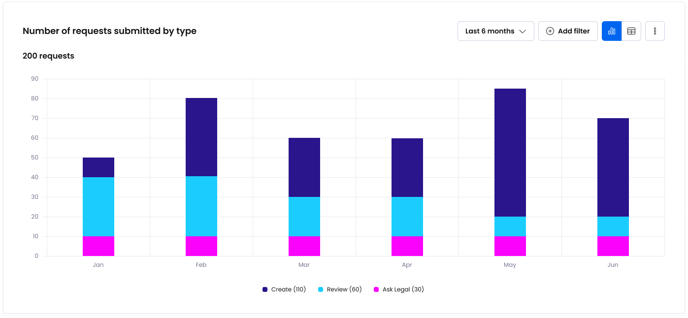
This chart measures the number of requests being submitted over time, broken down by request type. It helps you monitor overall volume and adoption from your business.
Answer questions like:
- How many Create requests are being submitted month by month?
- How does the volume of Create requests compare to the volume of Review requests?
- How much has business adoption increased in the last 6 months?
Number of requests submitted by template

This chart measures the number of requests being submitted over time, broken down by template. It helps you monitor volume trends for different agreement types.
Answer questions like:
- How many NDAs are being requested by Sales?
- How many Order Forms are being requested each month?
- Which agreements types are requested the most?
- Are volume levels increasing or decreasing?
Number of requests submitted by user
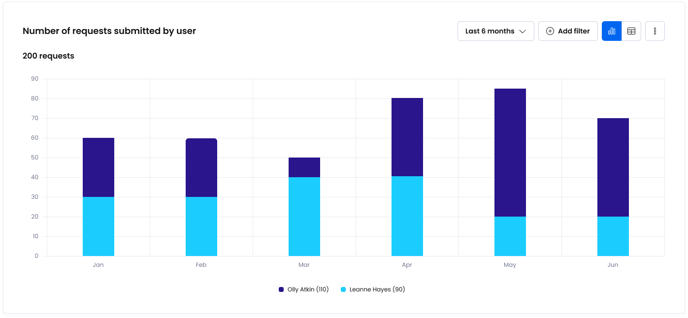
This chart measures the number of requests being submitted over time, broken down by which user made the request. It helps you monitor adoption levels of different users within your business.
Answer questions like:
- Who requests the most NDAs?
- Who from Sales makes the least amount of requests?
- How does adoption compare for users in HR?
- Is adoption increasing for certain users?
Number of requests submitted by group

This chart measures the number of requests being submitted over time, broken down by which group made the request. It helps you monitor adoption levels of the different groups within your business.
Answer questions like:
- Which group submits the most requests?
- How does adoption compare for the different groups in my business?
- Is Sales adoption increasing or decreasing over time?
Number of requests submitted by source
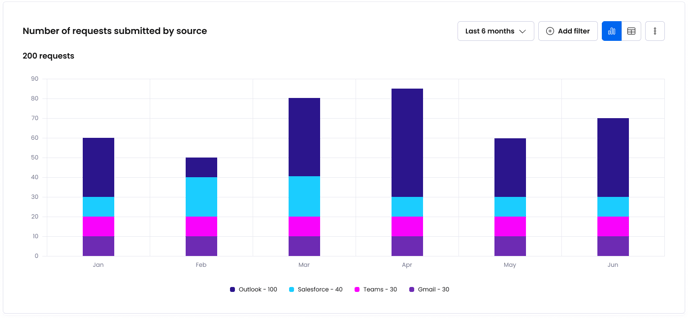
This chart measures the number of requests being submitted over time, broken down by where the request was submitted from (e.g. Outlook, Gmail, Teams, Slack, Salesforce). It helps you monitor and compare adoption levels for different integrations.
Answer questions like:
- Where are most requests being submitted from?
- Is adoption of Salesforce increasing over time?
- How does adoption of Outlook compare with MS Teams?
Number of tasks created by request type
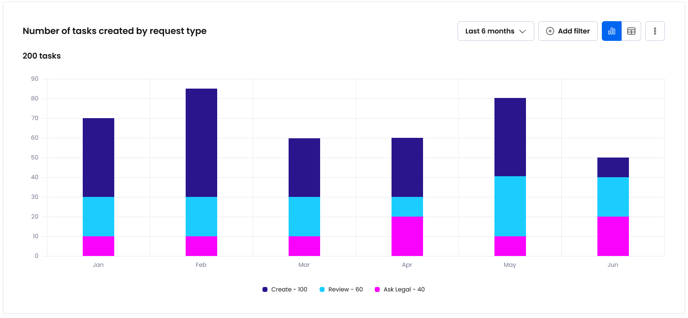
This chart measures the number of tasks created over time, broken down by the type of request they were created for. It helps you understand the overall volume of tasks being created, volume trends and workload needs.
Answer questions like:
- How many tasks are being created month by month?
- As adoption increases, how much is the volume of tasks increasing over time?
Number of tasks created by template

This chart measures the number of tasks created over time, broken down by which template they were created for. It helps you understand and compare overall volume trends for different types of agreements in your business, and workload needs.
Answer questions like:
- Which type of agreements generate the greatest number of tasks?
- Are the number of tasks for MSAs increasing or decreasing over time?
- Which agreement caused the increase in workload in April?
Number of tasks assigned to user
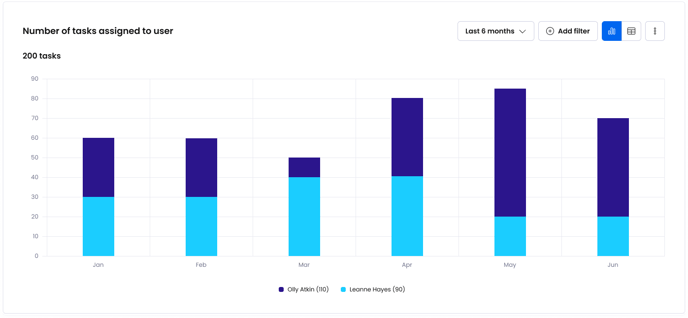
This chart measures the number of tasks created over time, broken down by which user they were assigned to. It helps you understand and compare workload distribution for different users in your business.
Answer questions like:
- Who gets assigned the most tasks in Legal?
- How are tasks distributed across users in Finance?
- Has task distribution been more even in the last 6 months after we changed our process?
Number of tasks assigned to group
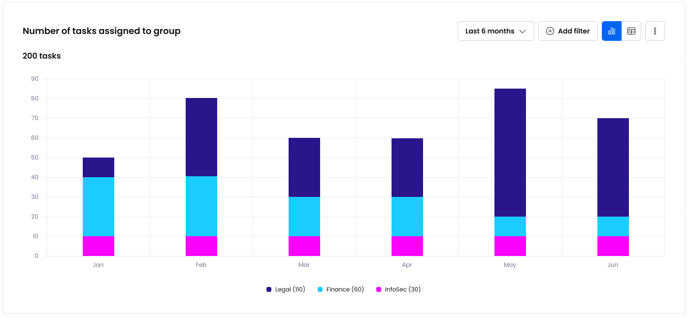
This chart measures the number of tasks created over time, broken down by which group the assignee belongs to. It helps you understand and compare workload distribution for different groups in your business.
Answer questions like:
- How many tasks are being assigned to finance month by month?
- Is the number of tasks being assigned to legal increasing?
- Has the number of tasks being assigned to InfoSec decreased over the last 6 months since we changed our process?