
Linked documents are used for supporting documents, such as Statements of Work or Addendums
If your master contract has any supporting documents, you can either upload those as their own master documents and associate them to each other using Contract Relationships, or you can upload them as a linked document against the master.
How to Upload a Linked Document
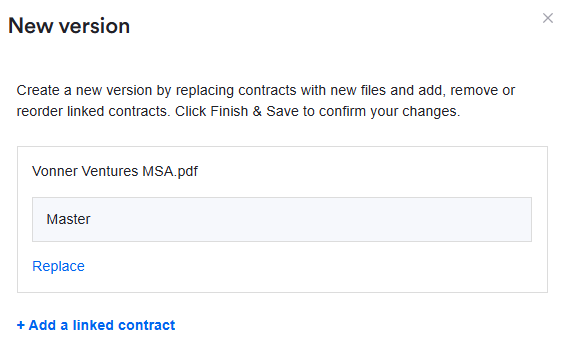
To upload a linked document, click 'New version' in the top right of the screen:

In the pop-out, click '+ Add a linked contract':
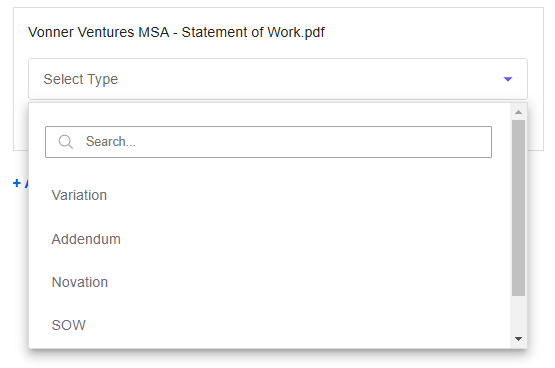
Select the document from your device and upload. Once uploaded, you can select the type of linked document from the dropdown:
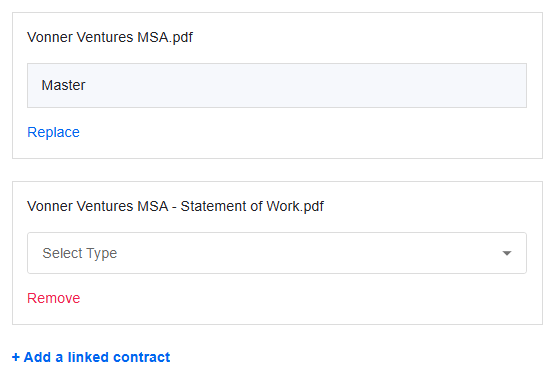
(This is just a label. If you can't find the right option for your document, note that this doesn't impact any functionality)
You can repeat the above steps if you have multiple linked documents to upload. Once ready, click 'Finish & Save' in the bottom right:

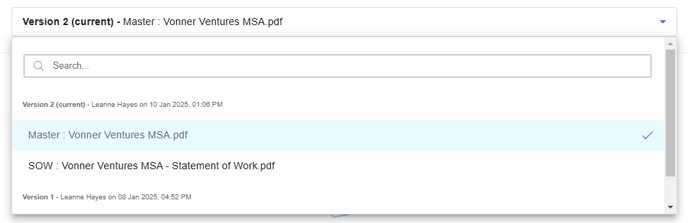
You can now use the dropdown above the contract preview to switch between different versions and linked documents:
Linked Documents & Contract Summaries
Contract summaries (configured via Clause Manager) take into account the content from within both the master contract and the linked contracts.
If a contract has one or more linked contracts, we take the paragraphs from the master document and append all the paragraphs from the linked documents when attempting to generate a clause summary.
The combined list of paragraphs then go through the scoring process based on the Clause Manager configuration (i.e. number of keywords found).
After the basic scoring is done we have two score ‘boosters’ which boost the paragraphs scores based on the proximity of other scored paragraphs and whether the paragraph is within a linked contract. In the instance a paragraph is from a linked contract the score is boosted, meaning if the same paragraph was in both the master and linked contract, the linked one would score higher. For example, if a clause was in both the master and the variation linked document, we assume the linked document, i.e. the variation, is the most up to date and appropriate.
After scoring is complete we then take the top results based on how the clause is configured and generate the summary whether that’s using AI, custom text or original text.