
Access updates on our latest product features and find all the information you need to take full advantage of the Summize product.
Explore the sections below for summaries of our latest feature releases and tips on maximising the benefits of Summize for ongoing CLM success. While we highlight key feature updates here, we also regularly roll out performance improvements and user experience enhancements to keep everything running smoothly.
2025 - Q4:
- Word Add-in UI Update
- General UX/UI Improvements
- Repository CSV Export
- GPT-4.1 for AI Assistant in Word
2025 - Q3:
- Repository IDs
- Salesforce: Notes & Attachments Behaviour
- Update to Teams and Slack Assistants - Buttons to Initiate Request Flow
- GPT-4.1 for Review Pro
- Filterable Audit Log
- Improved Login Experience
2025 - Q2:
2025 - Q1:
- Send for Signature for Requestors
- Editable Collaborator Permissions
- Default Event Notification Emails for Contract Owners
- Field Mapping Locking
- Licence Updates
- SharePoint Backup
- Analytics: Export to CSV
2024 - Q4:
- Question Grouping in Create Templates
- Custom Event Reminders in Clause Manager
- Refreshed UI for Review & Ask Legal Template Settings
- Updating Create Templates - Replace feature
- Create 'Template Questions' and updated UI
- AI Assistant Improvements
- Request Analytics (Phase 2)
- AI Redlining
- Evergreen Repository Dates
- Repository Date Extraction Improvements
- HubSpot Integration
2024 - Q3:
- GPT-4o In AI Assistant and Clause Summaries
- Playbook Editor Improvements
- PDF to DOCX Conversion using Word for the Web
- Request Analytics (Phase 1)
- Repeat Tasks for Repository Contracts
2024 - Q2:
- Requestor User Licence
- Collaborate in Word for the Web
- Send to Adobe Sign
- Gmail Assistant
- Outlook Assistant
2024 - Q1:
- AI Party Name Detection
- Compare Request Versions - save as new version
- Re-ordering Conditional Questions in Create
- Question types for Review and Ask Legal
- Google Drive Backup v2
- Contract Relationships
2023
- Custom AI Summaries
- Company Lookup via Microsoft Dynamics 365
- AI Assistant: Compare to Playbook Prompt
- Compare Request Versions
- Send to Docusign
- Microsoft Word for the Web
- AI Assistant
- Oneflow E-Signature
- Salesforce Integration
- Custom Fields
- Assign Task to Requestor at Template Level
- Premium Playbook
- SLA Table to Review
- Multiparty Contracts
- Requests
- Calendar Sync
- Google Drive Backup
✨ Word Add-in UI Update - Released December 2025
We've updated the interface and navigation of the Word add-in to make your favourite features easier to find. The refreshed look lays the foundation for bigger updates and exciting new features coming in early 2026!
Read more about the updated interface here.
✨ General UX/UI Improvements - Released throughout Q4
We're working on lots of small, incremental improvements to improve the overall Summize user experience.
These improvements include:
- Re-working the panel you see on the right hand side of requests and repository contracts, to make it much more responsive on different screen sizes (as well as refreshing the icons and components)
- Attachments now have a counter so it's easier to see when files have been uploaded
- The Repository contract processing pop-up now includes a quick link to the Customer Hub article explaining any processing issue codes for quick troubleshooting
- The contract previewer no longer zooms out when you switch between versions
- When configuring folder visibility, the folder list now displays in alphabetical order for easier configuration
- 'View In Summize' buttons on notification emails should take you to the right page once you login, instead of the Repository dashboard
- Clicking back when editing a request template will take you to the correct tab, rather than always defaulting to 'Create'
- Folder search on the Repository dashboard to increase usability of repositories that have a high number of main folders and sub folders
✨ Repository CSV Export - Released November 2025
We’ve just released a full re-write of our repository export!
The previous Excel export had a few issues - it often failed with larger repositories.
Our new export is:
✅ Simpler – we’ve stripped out the old, confusing options and really simplified the UI
✅ Faster – it’s now much more performant, even on big repositories.
✅ More flexible – we’ve switched from Excel to CSV, which is a more familiar and flexible format for this kind of process. Plus - switching to CSV helped improve its performance.
There’s also a brand new export option to download all calendar events in CSV file, giving users better visibility of their contract obligations in one place.
Read this article to find out more!
✨ GPT-4.1 model for AI Assitant in Word - Released October 2025
Following the upgrade of Review Pro to GPT-4.1, we've now upgraded the AI Assistant in Word to match. This should give users more accurate responses, greater context windows and improved reasoning.
✨Repository IDs - Released October 2025
Previously, automated IDs were only available in Requests. Now, based on customer feedback, we’ve added them to the Repository to make it easier to reference, report on, and manage contracts.
Repository IDs are…
- Automatically generated, alphanumeric, and unique (different to Requests, where they are numeric, automatically generated and sequential)
- Assigned to every master Repository contract
- Never reused, even if a contract is deleted
Where you’ll see them
- In the repository table view (made visible via the Columns panel – unticked by default)
- In the Contract Information panel when viewing a contract
- In repository table exports
- When clicking on the (i) icon when creating a relationship or getting files from Summize via Outlook/Gmail
- In Repository Word exports
This gives users a reliable way to reference contracts consistently across Summize and in reporting.
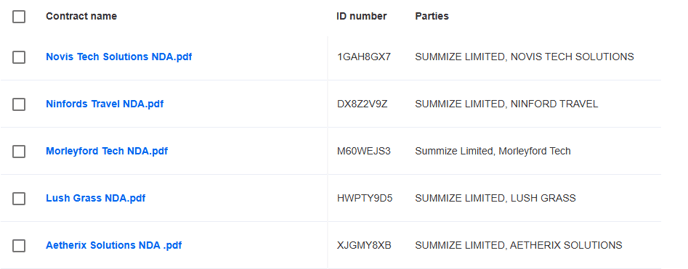
✨Salesforce: Notes & Attachments Behaviour - Released September 2025
We have introduced a new setting in our Salesforce integration that gives you the flexibility to control whether documents generated via the Create Request workflow are automatically uploaded to the Notes & Attachments section of the relevant Opportunity or Account. This update responds directly to customer feedback - we understand that automatic uploads aren’t always desirable.
See our guide here for instructions on how to update this setting.
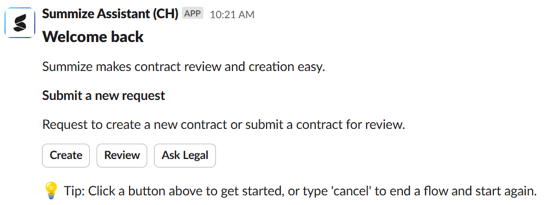
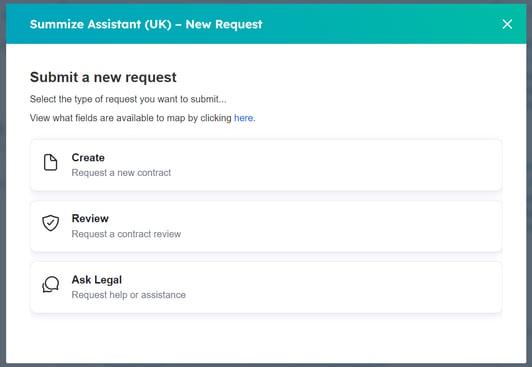
✨ Update to Teams and Slack Assistants - Buttons to Initiate Request Flow - Released August 2025
We’ve made it easier and less error-prone to start a request from our Summize Assistant bots.
Previously, you had to type commands like create, review, or ask legal to initiate the request flow. This sometimes caused confusion or mistakes, and we've had feedback from users that they didn't like this user experience.
Now, you’ll see buttons in the welcome message to kick things off.
Slack:
Teams:
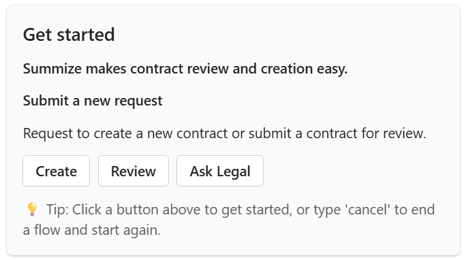
(Typing 'Create', 'Review' and 'Ask Legal' still works, if you liked that user experience!)
✨ GPT-4.1 model for Review Pro - Released August 2025
Pro Users will now benefit from an upgraded GPT model for Review Pro.
This means your contract reviews are now:
-
More accurate – improved understanding of contract language for sharper, more reliable suggestions.
-
Faster – streamlined performance gives you quicker results.
-
More consistent – better handling of complex or unusual contract wording for dependable outputs.
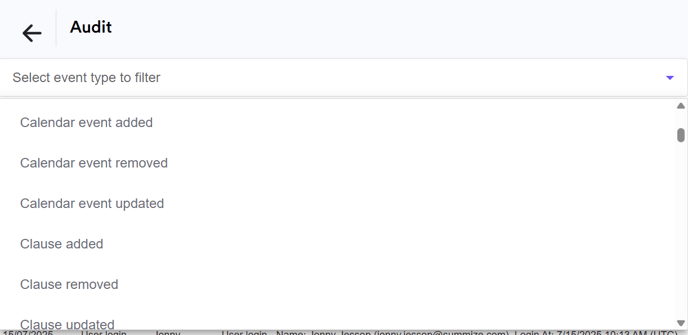
✨Filterable Audit Log - Released July 2025
A small but helpful update! For users with Admin privileges, the Settings > Audit page now has a handy filter, allowing you to better track activity across the account:
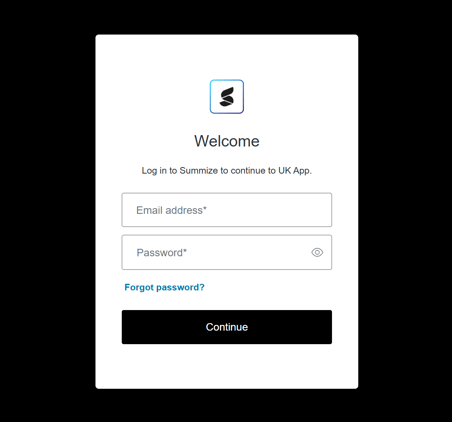
✨Improved Login Experience - Released July 2025
As part of our ongoing focus on security and user experience, we upgraded the underlying technology that powers 'Summize Authentication' (i.e. using an email and password to log into Summize, as opposed to Single Sign-On) to a new system.
This upgrade:
- Improves the login experience – especially when resetting forgotten passwords
- Enables more self-serve options – no need to contact support for forgotten password issues
✨ Task Sequences - Released May 2025
You can now add step-by-step task sequences to your Create, Review, and Ask Legal templates, allowing tasks to be completed in a specific order - ideal for structured reviews or multi-stage approvals.
- Users can add one or more task sequences per request template, with as many tasks as needed in each.
- Each sequence generates tasks one at a time based on completion of the prior task in the queue
- Conditionality can be added to the sequence to control when sequences are triggered
- Existing 'standalone' tasks are unchanged - now you can mix both!
Benefits:
- Streamlines approval processes (e.g., Finance > Legal > InfoSec)
- Increases efficiency - ensures users only see the task that’s relevant right now and aren't brought in too early
- Reduces admin - no more manual tracking or chasing
The following articles have been updated with guidance on how to setup task sequences:
We've also created this brand new article covering all features around approvals and templated task setup.
✨ Review Pro - Released April 2025
Say goodbye to manual contract reviews!
Our powerful AI helps you spot compliance issues, redline contracts, rephrase clauses and create summaries directly in Microsoft Word, improving accuracy and speeding up reviews.
Review Pro will:
- Analyse the full contract against your templated guidance
- Highlight any compliance issues
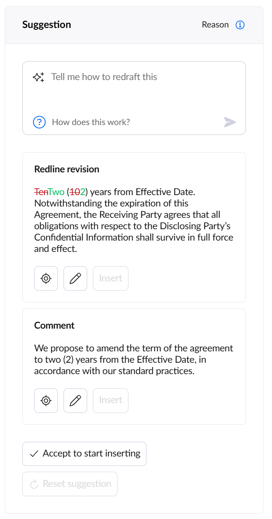
- Suggest redlines to remedy those issues and bring the document in line with your gold standard
- Generate comments to easily insert into Word to explain the reason for your redlines
- Help you uncover any hidden risks by analysing the content not covered in your template
All within a matter of minutes!
Read the feature release blog here!
Learn how to setup a template here and learn how to use the feature in Word here.
👤 Send for Signature for Requestors - Released March 2025
Requestor-level users can now send documents for signature (DocuSign, Adobe Sign, Oneflow) directly from a Create or Review request. This is controlled at template level - Power Users decide which templates allow it, which keeps sensitive/higher risk workflows restricted where needed.
Benefits:
- Self-serve from start to finish - Requestors can now create, submit, and send to signature without relying on legal
- Reduces bottlenecks and takes more pressure off busy legal teams
See updated Create and Review template setup guides!
👤 Editable Collaborator Permissions - Released March 2025
Admins now have more control over what Collaborator and Collaborator Pro users can do.
What’s New?
Admins can now easily edit and restrict the following permissions for Collaborator and Collaborator Pro users:
- Upload / rename / delete / download contracts
- Change contract or request owners
- Edit clause summaries in Review requests and Repo
- Manage calendar events
- Upload / download via Outlook & Gmail add-ins
Benefits:
- More control over what Collaborators can and can’t do
- Protect sensitive actions like deleting or editing contracts
Where to find it:
Admins can edit these in Users & Permissions > Permission Settings
Read this article for a full breakdown!
✨ Default Event Notification Emails for Contract Owners - Released March 2025
The default 7 day and monthly email notification for calendar events was previously only sent to Power Users who had visibility of the contract.
This has now been expanded to contract owners, regardless of licence type.
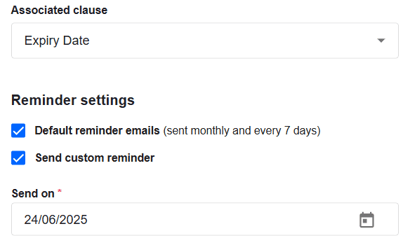
If the below default reminder checkbox is ticket on a calendar event, all Power users and contract owners will receive an email, both on the 1st of the calendar month and 7 days prior:
See updated email notification guide here!
✨ Field Mapping Locking - Released March 2025
This new feature designed to enhance data consistency and accuracy when using Salesforce, HubSpot, or Jira to submit requests.
How does it work?
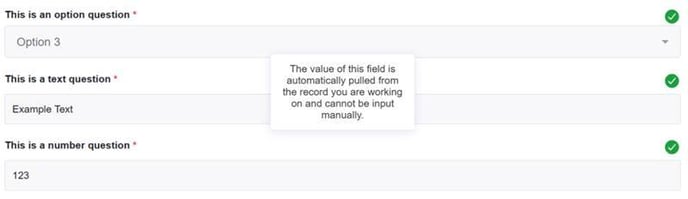
- If a field is mapped to a property on the source object (e.g. a Salesforce opportunity, a HubSpot company or a Jira ticket) and the property has a value, it will now be locked, meaning users cannot manually edit it in Summize.
- If a field is mapped but empty, users will need to populate the data on the source object first, ensuring that any approval processes are followed before it appears in Summize.
- Any fields that aren't mapped can be edited as normal.
- This can be enabled on a per-template basis, giving customers full control over when field locking is appropriate and when manual edits are still needed/allowed.
Why does this matter?
- Prevents edits to already validated data. E.g. a commercial user can't change the contract value on the draft agreement!
- Ensures consistency across systems, reducing discrepancies.
- Supports compliance by reinforcing approval processes in external tools.
Find out more here!
👤 Licence Updates - Released January 2025
We’ve had new names for our licences for a while now, and now the product has finally caught up! 🎉
🔹 Introducing Pro licences: Pro users get access to AI Redlining. This is our new premium tier for those who want to take their contract reviews to the next level with AI-powered analysis and redlining.
🔹 Licence name updates: We’ve updated our licence names in the web app to better match how we talk about them with customers, reducing any confusion when interacting with the product:
✅ Full > Power
✅ Business > Collaborator
✅ Admin is now a Power user setting, rather than a separate licence
🔹 A refreshed Users & Permissions page: As part of this release, we’ve also updated the Users & Permissions page with a clearer UI and improved experience, making it easier to manage user access across teams.
Updated articles here and here!
🔗 SharePoint Backup - Released January 2025
We’ve just launched our SharePoint integration, allowing customers to automatically back up their Summize files (requests and repository documents, including attachments) to a SharePoint folder. For those familiar with the GDrive backup, this works in the same way. This is designed for backup purposes only - ideal for customers who require their contract data to be backed up in a secondary location.
 What this means: Customers can securely store a backup of their Summize files in SharePoint. It's super easy to setup! Guide here
 What this doesn't mean: This is not intended as a second contract repository! We want customers to fully adopt Summize as their primary contract repository, ensuring they get the most out of its additional features - calendar, AI summaries, collaboration, reporting etc.
If customers ask about this integration, emphasise that it's a backup solution rather than an alternative repository.
✨ Analytics: Export to CSV - Released January 2025
You can now export analytics data to CSV 📊 directly from Summize. This update will allow you to:
✅ Dive deeper into your data – Analyse and manipulate metrics using your tools of choice.
✅ Share insights easily – Exported data can be shared with external stakeholders or colleagues who don’t use Summize, ensuring everyone stays informed and aligned.
Users can either export all data associated with that chart, or export a filtered view.
Updated article here!
✨ Question Grouping in Create Templates - Released December 2024
Create templates just got smarter! You can now group related contract questions together, making the submission process clearer and more user-friendly. This feature is especially handy for populating tables and related question sets. For example, if the contract template had a table with multiple columns and rows (e.g. for yearly price breakdowns), this can be quite hard for a user to navigate without having the document in front of them. Now that questions can be grouped, this should greatly improve user experience, especially for longer create templates.
Benefits:
- 💡 Clearer workflows = reduced confusion for end users
- 🌟 Better experience = more adoption!
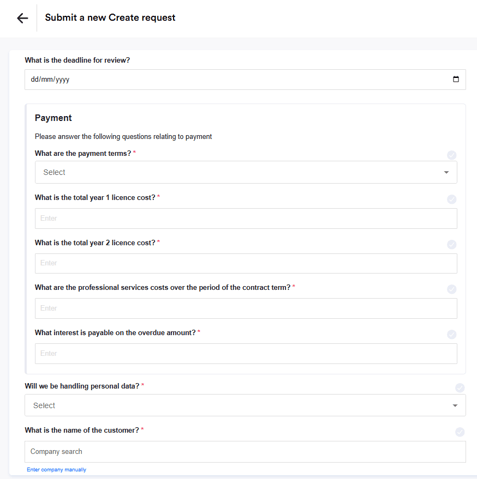
See updated guide here.
✨ Custom Event Reminders in Clause Manager - Released December 2024
You can now configure custom reminders for key dates via Clause Manager (e.g., X days before an event). Any date extracted from clauses will automatically include the reminder—no manual setup needed! Prior to this update, this would have been a manual process to go to every extracted date and configure a custom reminder. Now this it is possible in clause manager, any date extracted against that clause in that contract type will have consistent reminders.
Benefits:
- 🕒 Saves time by automating the creation of reminders.
- 📅 Ensures consistency across all dates.
- ⚡ Reduces the risk of missed key dates.
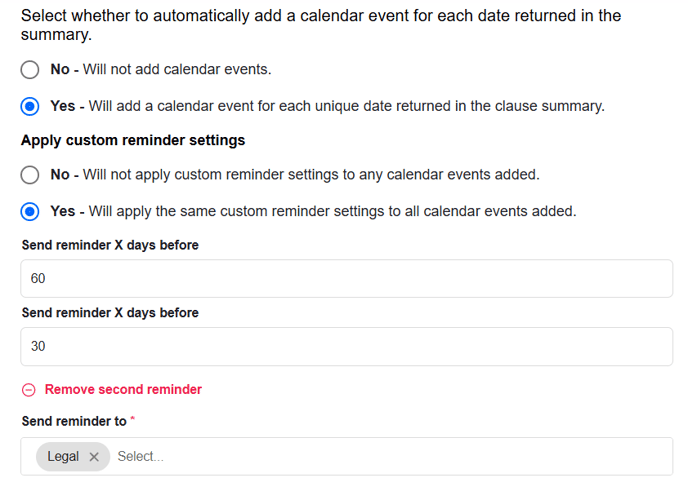
Read more here!
✨ Refreshed UI for Review & Ask Legal Template Settings - Released December 2024
We’ve refreshed the UI for Ask Legal and Review templates to match last month’s updates to Create. Settings are now split into submenus, making navigation much more intuitive and organised.
Benefits:
- 🔍 Faster access to key settings
- 🎯 Less clutter = easier to navigate and a smoother experience for Power users!
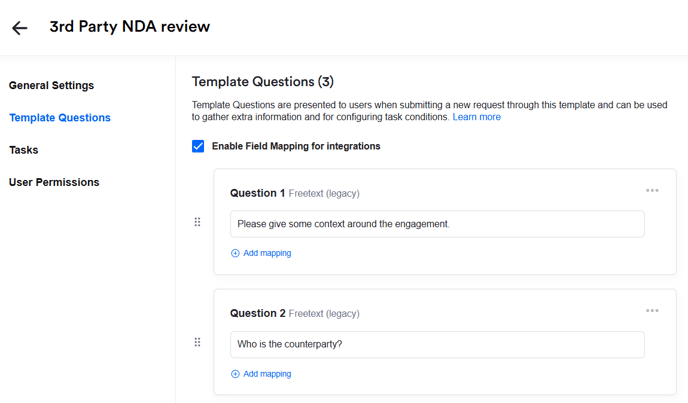
✨ Updating Create Templates - Replace feature - Released November 2024
Create templates can now be replaced, eliminating the need to create a new template from scratch when making changes to a Word document or adding/removing questions.
When a document is replaced, key changes are highlighted (e.g., questions added or removed), while preserving all original configuration, including:
- Existing question re-ordering
- Tasks
- Access permissions
- Notification settings
All you then need to do is re-order any new questions (if necessary) and create or edit any conditional tasks—and that’s it!
Also, any edits made to question text in the web app is now preserved when you download the Word document to make larger edits.
See updated guide here.
✨ Create 'Template Questions' and updated UI - Released November 2024
Introducing 'Template Questions' in the Create workflow. Template Questions allow you to ask questions during the Create workflow that do not populate the contract, so are great if you want to gain any additional context from the user to help your approval process and to help delegate the request to the right person or people for review using conditional tasks.
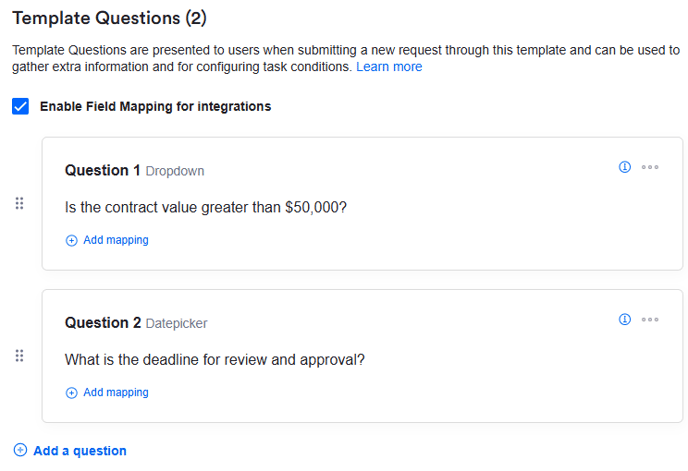
Not only that, but we have refreshed the UI of the Create template configuration to make setting up, updating and managing these templates much easier.
Read the updated Create setup guide here to find out more!
✨ AI Assistant Improvements - Released November 2024
We've released some improvements to how our AI Assistant in Word works:
- Document is now auto-included, so no need to copy + paste it into a message.
- Pressing 'enter' now sends the message - if you need a new-line, then press 'shift + enter'.
- Much better logic for keeping the chat around when switching pages in the add-in - you should now be able to go from the Ai Assistant page to the Playbook page and back without losing the chat. Note: It retains it on a 'session' basis, so if you refresh the page it'll reset.
- More scalable Ai engine. This should make the AI Assistant significantly more performant for larger documents.
- The Compare to Playbook default prompt now allows you to compare against the entire Playbook (not just a specific clause/section).
✨ Request Analytics (Phase 2) - Released November 2024
We've added additional charts to the Request Analytics feature! It's now possible to track time-in-status data, helping you identify bottlenecks and monitor your SLAs with greater precision. See performance trends over time for Create, Review and Ask Legal requests, as well as performance comparisons to see which templates and contract types take more or less time to resolve or negotiate.
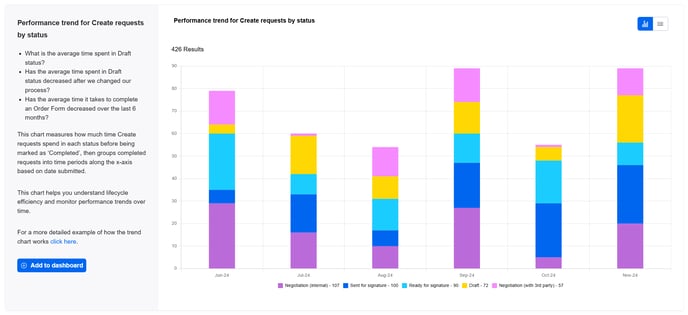
Read the updated Analytics articles here to understand how each chart can be used.
✨ AI Redlining - Released October 2024
AI Redlining is designed to significantly reduce the time and effort required for manual reviewing and redlining of your lower value Legal work, freeing you and your team up to work on more strategic tasks.
The Summize Word add-in will review your entire document based on your specified rules, marking each rule as either compliant or needing review, and provides specific redlines for any that need correction. Instead of replacing an entire paragraph that fails, it will only redline specific words or phrases that need amending.
See it in action here!
For more information, read this article.
✨ Evergreen Repository Dates - Released October 2024
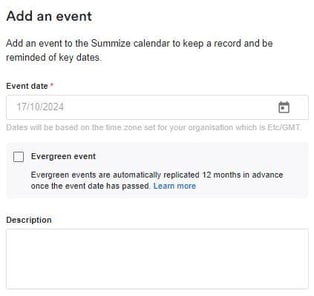
You can now set a date as 'Evergreen', which means it will automatically recur on the same date each year, with the same reminder settings.
As soon as the current date falls in the past, a new date will automatically be created with the same information and settings, for the same date the following year.
You can make an automatically generated event evergreen by checking the box in the calendar panel, or you can check evergreen when you create a manual calendar event.
When editing an existing event:
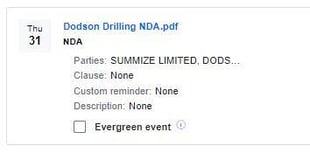
When creating manually:
This release ensures date and obligation management in Summize becomes easier and more accurate!
This article has been updated.
✨ Repository Date Extraction Improvements - Released October 2024
We've just released key improvements to how we extract and add dates to the calendar, significantly enhancing accuracy.
What’s changed?
Previously, we only captured dates from the top related paragraph of the clause. If there were multiple, relevant dates in the contract, only the first one in that top paragraph made it to the calendar, leaving other important dates untracked.
Now, with AI-generated summaries, we’ve changed how this works. Date extraction is now based on the clause summary output as a whole, not just the top related paragraph. This means that, regardless of whether the customer chooses to output original text, custom text, or AI prompted summaries (default or custom), all dates found in the summary will be added to the calendar when the 'Add date to calendar' option is selected in Clause Manager.
Key Benefits:
- Greater accuracy in date extraction
- More relevant dates will be automatically tracked
- AI prompt detection: Dates not explicitly mentioned in plain English (e.g. a contract with a start date and term but no clear end date) can now be identified and added to the calendar
These updates ensure that important contract dates are captured more comprehensively and accurately, making Summize an even more reliable tool for tracking contract obligations.
🔗 HubSpot Integration - Released October 2024
Our HubSpot Legal Front Door integration is now available to beta customers! With this integration, users can seamlessly submit and update Create, Review and Ask Legal requests directly in your existing HubSpot account, without having to switch applications.
Against HubSpot’s Deal and Company records, teams can easily generate standard contracts, such as NDAs, while more complex reviews and requests are routed to Legal through pre-defined Summize workflows. Each contract’s status is visible to all, improving communication and preventing unnecessary bottlenecks.
If you're a HubSpot user, reach out to your CSM to explore how this integration can streamline contract generation for your team.
Find more details here.
🔗 Salesforce Integration (V2) - Released September 2024
Our latest Salesforce integration package, Version 2 (V2), brings enhanced functionality and numerous benefits, including:
- New Account/Opportunity Page Widget: View related Repository contracts directly within Salesforce. See widget descriptions in this section below.
- Enhanced Data Mapping: Map data from a Repository contract's clauses and custom fields back to Salesforce Opportunities. See guide here.
- Summize App Integration: Access the full Repository, Request Table, and Request Analytics directly through the Summize App. See guide here.
- Centrally Configured Settings: settings are now configured centrally, instead of per widget, saving time during setup.
Existing Salesforce users can use this guide to migrate from V1 to V2.
New Salesforce users can use this setup guide to start reaping the benefits of this enhanced Legal Front Door!
✨ GPT-4o In AI Assistant and Clause Summaries - Released September 2024
All customers will now benefit from an upgraded GPT model across our AI Assistant in Word and our AI generated clause summaries.
Key Benefits:
Increased context: GPT-4o mini has a much higher token limit of 128k, allowing users to input significantly more contract text into the AI Assistant and into Clause Manager. As a result, we've increased the related paragraph limit in Clause Manager to 30 paragraphs (previously 20).
Increased accuracy: GPT-4o mini is not only more accurate, but it also handles ambiguity and nuance better than previous models. This, coupled with the increased context, will significantly improve the accuracy of clause summaries and AI Assistant responses.
✨ Playbook Editor Improvements - Released September 2024
This update transforms the Playbook experience (formerly 'Premium Playbooks'), offering a cleaner, more intuitive interface for creating and updating Playbooks. The old style playbooks are still accessible but are now renamed as 'Basic Playbooks,' with the improved UI naturally guiding users towards the enhanced version.
Key Benefits:
 Easier Navigation: The updated tile layout aligns with the rest of the Summize platform, making navigation simpler and faster.
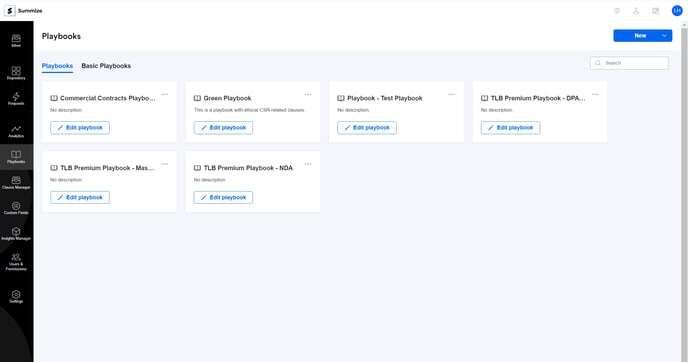
Effortless Editing: The redesigned builder experience is much more intuitive. You can now rearrange content, add new sections, and make inline edits with ease.
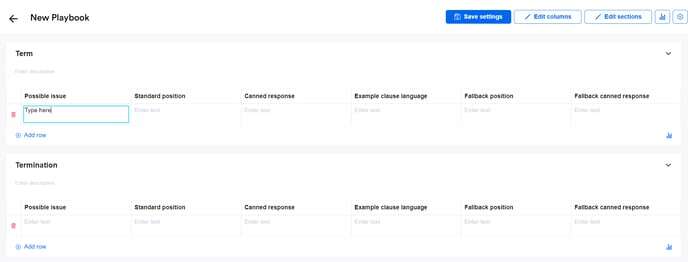
Accelerated Time to Value: With these improvements, teams can create and rollout Playbooks faster than ever.
Read more here!
✨ PDF to DOCX Conversion using Word for the Web - Released August 2024
Users can now convert PDF files into DOCX format directly within Summize. Once converted, the DOCX files can be opened in Word for the Web, making the review and redlining process faster and more efficient.
Key Benefits:
 Streamlined Workflow: Users can now convert PDFs to DOCX directly from the Request, eliminating the need to request Word versions from the counterparty or use external tools for conversion.
 Enhanced User Experience: By allowing direct editing in Word for the Web, users can immediately start redlining and collaborating on documents without leaving Summize.
 Time Efficiency: This feature saves valuable time, reducing the back and forth required to get a PDF into a working format for contract review and negotiation.
This article has been updated.
✨ Request Analytics (Phase 1) - Released July 2024
Our new pre-signature dashboards are live! Gain flexible reporting and deep insights into your contracting processes. Pinpoint bottlenecks, understand team workload, and analyse performance.
We continuing work on this feature to provide more available charts soon.
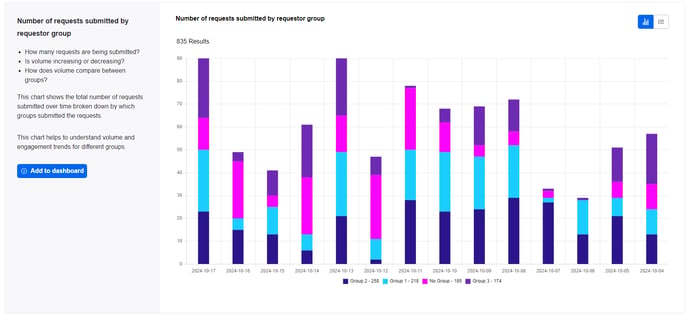
Learn how to start creating analytics dashboards here.
✨ Repeat Tasks for Repository Contracts - Released July 2024
This Repository feature allows you to set a schedule against a task, whether that's weekly, monthly, yearly, or custom, and it can either repeat indefinitely or end on a specified date.
The new 'Repeat' field appears once you select a due date on a repository task:
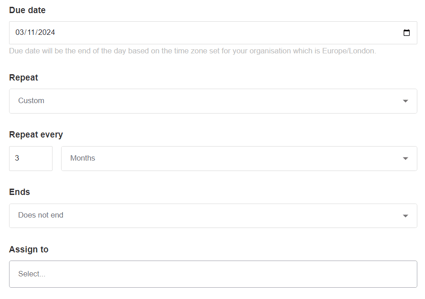
And once set, you can see the schedule in the task pane:
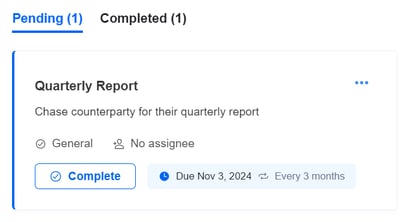
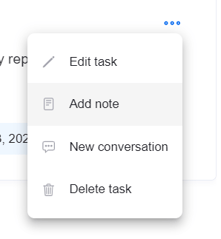
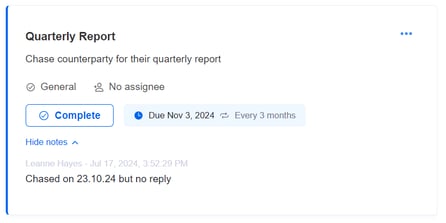
As part of this release, we also have added:
Task notes: Under the ellipses menu, add an update to a task via the 'Add note' button. Use this to update other stakeholders on task status whilst it's still pending.
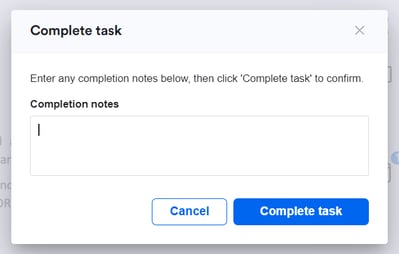
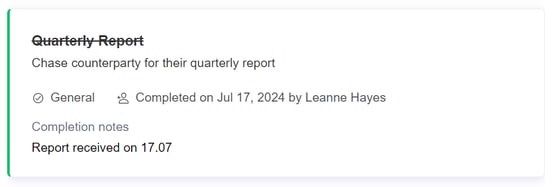
Completion notes: Add context when completing a task by filling out the (optional) field that now appears when you complete a task
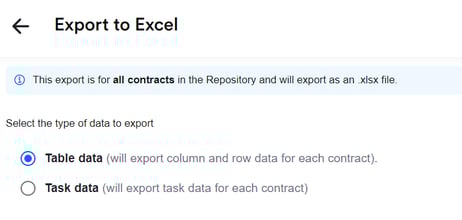
Task excel export: Export all task data to a new excel export to report on task status to other stakeholders. The below 'Task data' export option now appears when you go to generate a Repository export
(Note that the above features are only available on Repository tasks, not Requests tasks)
Use Repeat Tasks to track your ongoing obligations, such as contract renewals, reporting, supplier audits, and more!
Customer Hub articles for Repository tasks and exporting to excel are now updated with these new features.
👤 Requestor User Licence - Released June 2024
We now have a new tier of licence, which gives users more restricted access to Summize features. 'Requestor' users can submit Create, Review or Ask Legal requests through the web app or through any of our legal front door integrations. Post submission, they have limited access to features (for example, they cannot create tasks and cannot collaborate on any Requests they did not submit) and they do not have access to the Repository. This is ideal for infrequent users who may need to submit requests to the Legal team and track them to completion, but don't need access to additional Summize features. Get in touch with your Summize contact if you'd like to find out more!
✨ Collaborate in Word for the Web - Released May 2024
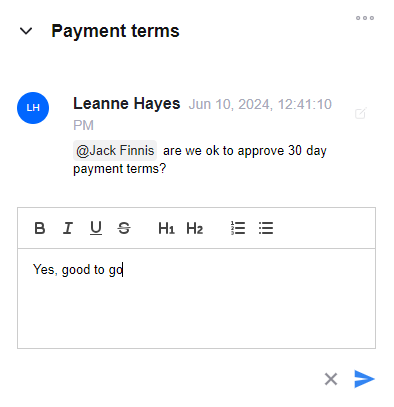
We have added the ability to create and respond to conversations, and create and complete tasks, all from within the Word add-in! When opening a Request in Word for the Web, you will now see an additional menu option for 'Collaborate'. No more tab switching while reviewing and redlining documents!
Find out how to use this feature here.
🔗 Send to Adobe Sign - Released May 2024
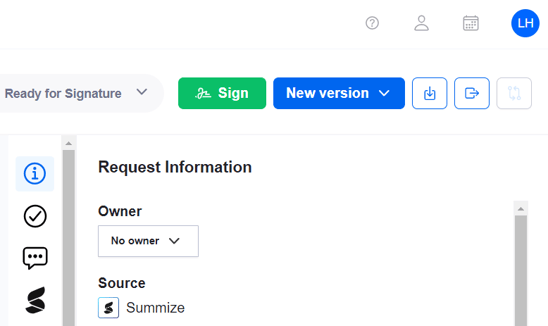
Speed up your signing and storing process with our enhanced Adobe Sign integration. Send your Create or Review Requests to Adobe Sign without needing to download, switch tools and upload. Signed documents will route back into your Repository automatically, without you needing to remember to upload manually.
Learn how to setup here!
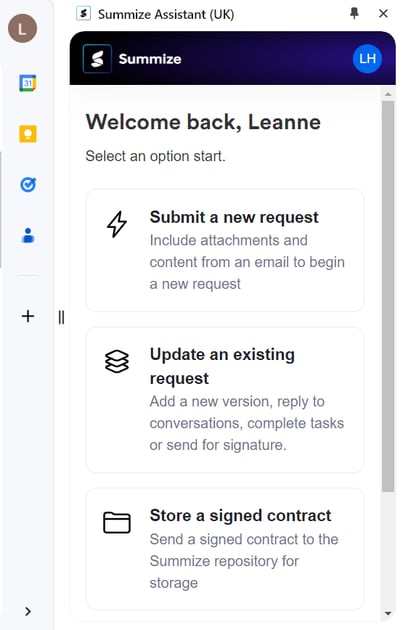
🔗 Gmail Assistant - Released May 2024
We now have a Gmail equivalent of our Outlook Inbox Assistant! Using our Chrome extension, submit and manage requests directly from your Gmail Inbox, reducing the need to switch tools.
Learn more here!
🔗 Outlook Assistant - Released April 2024
Submit and update requests directly from you Outlook Inbox! No need to download/upload documents and switch tools - stay in the tool where you communicate with your counterparties and increase the speed and efficiency of your requests.
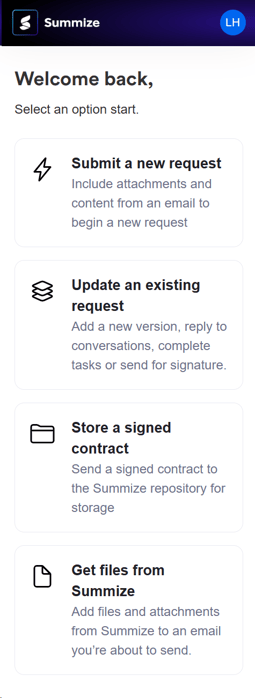
Learn how to use the Outlook Inbox Assistant here!
✨ AI Party Name Detection - Released March 2024
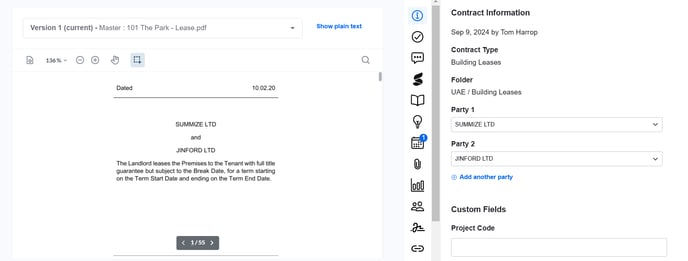
We've supercharged the way we extract party names in the Repository. We now use AI to scan the first portion of the document, and any detected party names will be added to the repository table and the contract information panel. Customers should start to see greater accuracy in party names with this update.
✨ Compare Request Versions - save as new version - Released March 2024
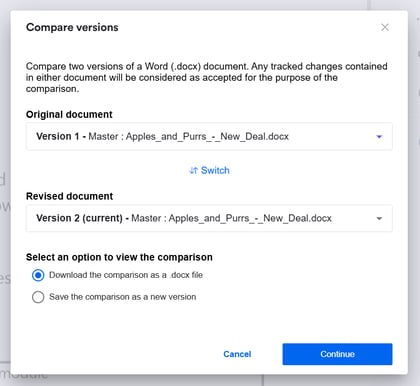
When comparing two docx files in a Request, you can now save that comparison document as a new version on the Request, making it more easily accessible by other members of the team.
See revised article here.
✨ Re-ordering Conditional Questions in Create - Released March 2024
You can now re-order conditional questions in Create templates so they no longer need to be asked at the start of the workflow. Now you can set a question order that makes most sense for the context of the template, improving the experience for the end user.
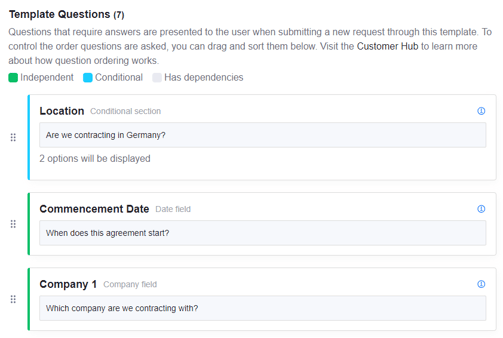
See the steps in this guide to learn more.
🔗 Google Drive Backup v2 - Released March 2024
We have released a new and improved Google Drive backup integration, which allows Admin users to backup their Request documents and Repository contracts in a private or shared Google Drive folder. The backup mechanism replicates the document names and folder structure in Summize, making your backup much easier to navigate.
If you're interested in setting this up, follow this guide!
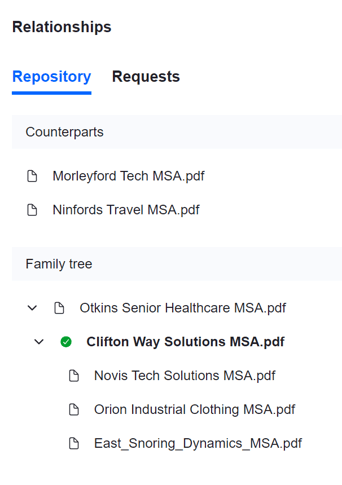
✨ Contract Relationships - Released February 2024
Revolutionise your repository with our latest feature! Easily visualise contract relationships, such as Master Agreements with their Statements of Work, through a contract family tree while maintaining individual summaries.
✨ Question types for Review and Ask Legal - Released February 2024
You asked, and we listened! Legal users can now include various question types like drop-downs and date pickers in Review and Ask Legal templates, as opposed to just free text questions. Allow your business users to self-serve with confidence, and get the information you need to process the request efficiently.
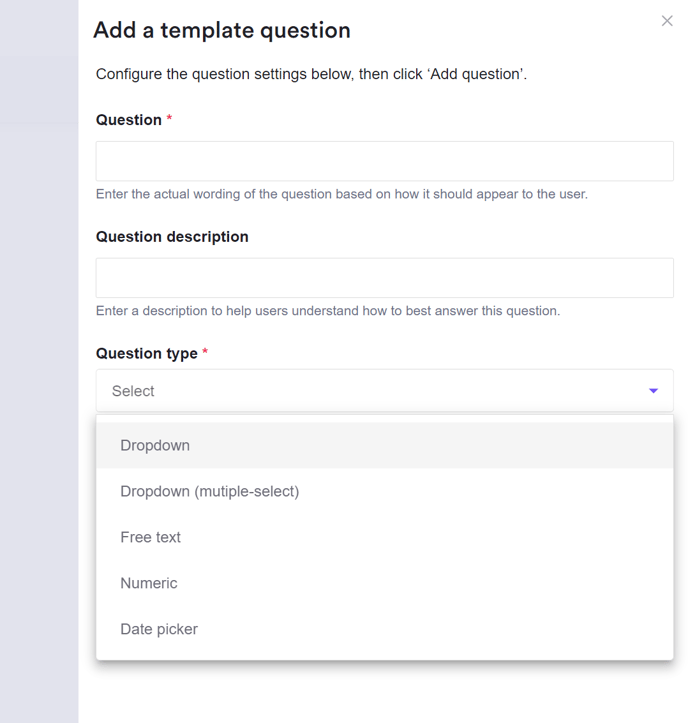
Red this guide for Review, and this guide for Ask Legal
2023
✨ Custom AI Summaries - Released November 2023
Enabling Summize AI on the clause in Clause Manager means that any new contract submitted for Review or uploaded to the Repository will have clause summaries powered by AI, as opposed to the original contents of the clause from the contract. You can have both original clauses and AI clauses making up a contract summary, so you may want to enable/disable for different clauses, depending on your preferred output for that given clause.
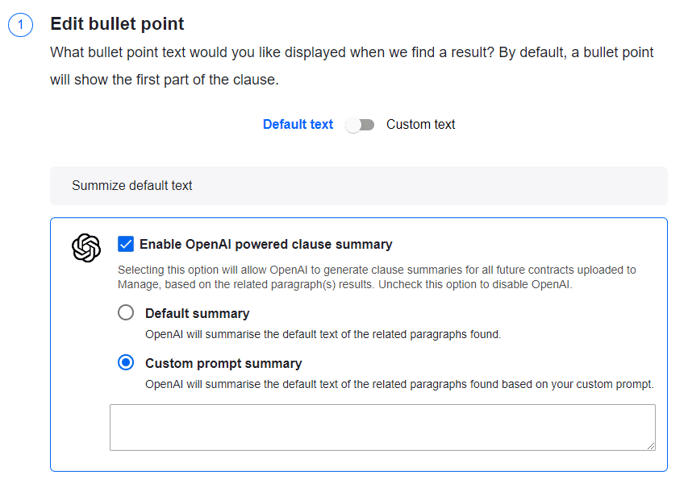
Head to the Clause Manager section on Customer Hub to understand how to setup AI summaries, and how to get the most out of them.
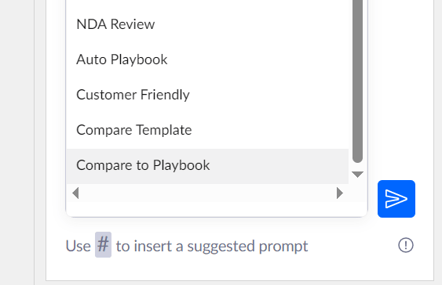
✨ AI Assistant: Compare to Playbook Prompt - Released November 2023
A new default prompt has been added to the AI Assistant in Word to allow paragraphs, sections or even whole documents to be compared to all areas / specific areas of a Playbook. Use this feature to help speed up your review process by comparing clauses to your standard positions and receive suggest redlines, all without leaving Word.
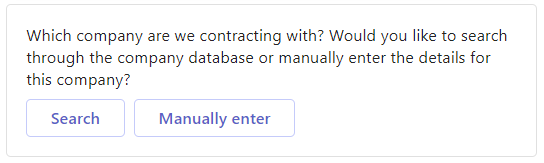
🔗 Company Lookup via Microsoft Dynamics 365 - Released November 2023
Customers who use Microsoft Dynamics 365 as their CRM can now use this database of companies for 'Company' questions in Create workflows (instead of the default database), meaning users can only select pre-approved companies when creating draft agreements.
Read this guide to find out more.
✨ Compare Request Versions - Released November 2023
Full and Admin Users now have the ability to compare two versions on a Create or Review request. Differences in the two versions are shown as tracked changes in the exported file.
-png.png?width=482&height=383&name=Screenshot%20(410)-png.png)
Find out more here!
🔗 Send to Docusign - Released November 2023
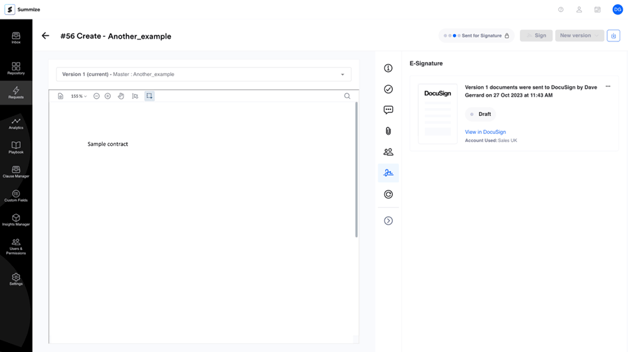
This integration ensures that you can send contracts from Summize to DocuSign for eSignature, receive real-time updates on the status of the envelope, and store signed contracts automatically into your Summize Inbox or Repository, without manual upload.
Read the guide here!
🔗 Microsoft Word for the Web - Release October 2023
You can now launch Word from within Summize!
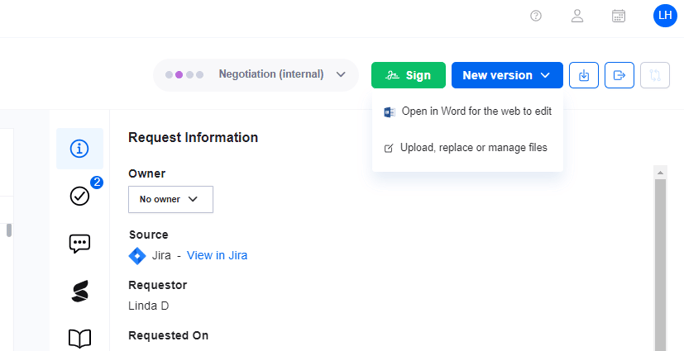
Summize has integrated with Microsoft Word Online to make reviewing and negotiating contracts more seamless. This update allows users to easily 'check-out' a contract to make changes via Word for the Web without having to download the document or leave the Summize platform.
This update performs native version control, helping users to avoid having a folder full of different versions without knowing which one is which. Enjoy access to a clear and central review process, with conversations, tasks and more!
✨ AI Assistant - Released October 2023
The AI Assistant is your always-on companion, making it easier than ever to work with contracts.
- Research, draft and receive summaries, without leaving Microsoft Word.
- Rephrase, translate, shorten and query sections of your contract.
- Set up templated prompts according to your most used requests, saving time on repeat tasks.
🔗 Oneflow E-Signature - Released September 2023

The Summize Oneflow integration allows users to push contracts to Oneflow from Summize. Once signed, the contracts are automatically sent to the relevant place in your repository.
This ensures your contractual workflows are quick and efficient, which ultimately lead your business to faster deals and revenue.
🔗 Salesforce Integration (Create, Review and Ask Legal) - Released in March 2023, Updated in July 2023
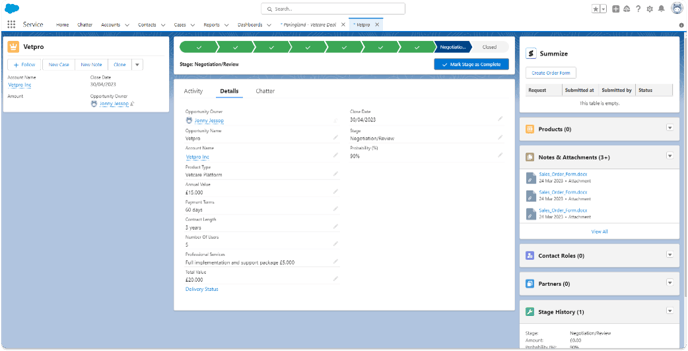
Previously, the capabilities of the Summize Salesforce integration empowered your sales teams to create contracts in the platform they love without creating separate, complicated workflows. Now, that also includes the ability to make Review and Ask Legal requests from Salesforce to ensure your deals move faster while legal retains full control.
✨ Custom Fields - Released July 2023
The Summize repository table has been supercharged to deliver a more seamless search experience. This update includes:
- Ability to add your own custom fields to tag a contract in a way that works for your business
- Seamlessly populate and save this information on your repository table for easier search and filtering (as seen in the video above)
Dive into your data with precision and find what you need in a flash. Custom Fields makes it easy to set and find vital information about your contracts.
This update was created from our customer’s feedback, highlighting our dedication to keeping customers involved in our product roadmap!
✨ Assign a task to a requestor at template level - Released July 2023
.png?width=688&height=342&name=Screenshot%20(23).png)
Previously, tasks could only be assigned on the contract level but with this update, users can now automatically assign tasks to the contract requestor when creating templates on Summize.
Simply assign a default task to a requestor when creating a new contract template or editing an old one.
✨ Premium Playbook - Released June 2023
.png?width=688&height=329&name=Screenshot%20(22).png)
All Summize customers now have BETA access to our premium playbooks.
In partnership with a leading legal design and operations consultancy, we’ve integrated best practice legal content directly within Summize for your whole contract lifecycle.
✨ SLA Data Added to Requests Dashboard - Released June 2023
.png?width=688&height=275&name=Screenshot%20(24).png)
.png?width=688&height=324&name=Screenshot%20(25).png)
This update empowers users to understand and report how quickly tasks are being managed within their organisation, as well as the average time to approval.
In addition to showing the average task completion time, the SLA dataset also shows the breakdown of tasks by type, providing a more granular look at SLAs.
✨ Multiparty contracts (up to 5) - Released June 2023
Seamlessly create multiparty contracts with Summize. When reviewing contracts, simply click the "Add another party" tab to include up to 5 parties per contract.
This update was created from our customer feedback and highlights our dedication to involving our customers in the Summize product roadmap.
-1.png?width=688&height=764&name=Screenshot%20(153)-1.png)
✨ Requests - Released April 2023
Summize, as the name suggests, started as a contract summary tool. Over time we then added tools to service the entire contract lifecycle, including integrated workflows through the Legal Front Door.
To allow for a frictionless end to end experience and to service larger Legal teams, we relaunched Summize in April 2023 with a slick new Requests interface. This brought our Legal Front Door functionality of Create, Review and Ask Legal into the Summize platform, allowing users to manage all pre-signature workflows within one interface in Summize.
Features released as part of this solution included Ask Legal workflows, Task Management, Intuitive Conversations, Attachments and Audit Trail Analysis for contracts.
✨ Calendar Sync - Released April 2023
.png?width=688&height=341&name=Screenshot%20(89).png)
Calendar Sync helps you stay up to date with crucial termination and renewal dates and syncs key events with your preferred calendar apps.
Use Calendar Sync to prevent unwanted autorenewals, putting a stop to lost revenue. Set custom reminders to trigger your internal conversations in advance of contract dates.
Click any of the links below for guides on how to set it up.
🔗 Google Drive Backup - Released April 2023
.png?width=688&height=337&name=Screenshot%20(26).png)
The Summize Google Drive integration allows users to seamlessly backup data directly to their Google Drive account. Once contracts are signed and stored in repository, they may also be backed up on Google Drive.