
Summary
Microsoft has deprecated an older authentication API, requiring us to update the Summize Outlook Add-in to use a new authentication method called Nested App Authentication. This change enhances security, but it does mean that users will need to accept a new permissions request when using the add-in.
What’s Changing?
Previously, the Summize Outlook Add-in authenticated using Microsoft’s now-deprecated API. To comply with Microsoft’s security requirements and ensure ongoing functionality, we have updated the add-in to use Nested App Authentication.
Key benefits of this new authentication method:
- Enhanced Security: Provides a more secure authentication process, aligning with Microsoft’s latest security best practices.
- Improved Stability: Ensures long-term compatibility with Microsoft Outlook.
- Streamlined Management: Microsoft admins can now approve the new authentication on behalf of their entire organization.
What Do Users Need to Do?
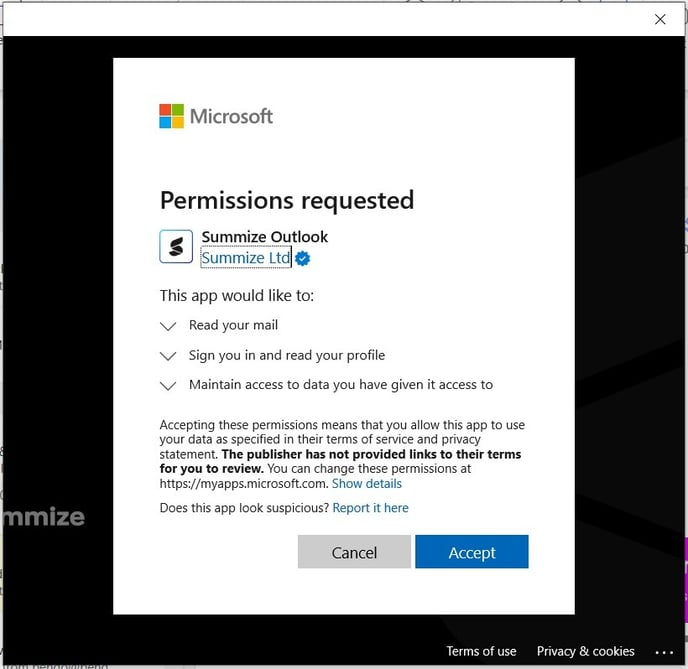
When launching the Summize Outlook Add-in, users will now see a permissions request pop-up from Microsoft (as shown below). To continue using the add-in, users must click ‘Accept’ to approve the updated permissions.
Required Permissions:
- Read your mail: Allows the add-in to access email content to scan for attachments when submitting or updating a request.
- Sign you in and read your profile: Authenticates your account and links it to Summize.
- Maintain access to data: Ensures a seamless experience without requiring repeated permissions granting.
What If My Organisation Manages Permissions?
If your organization manages permissions centrally, a Microsoft Admin can approve this request on behalf of all users. This eliminates the need for individual approvals.
How Admins Can Approve Organisation-Wide
- Visit Microsoft Entra Admin Center
- Navigate to Enterprise Applications > Summize Outlook Add-in
- Grant consent on behalf of all users
Note: if you do not see the Outlook add-in listed here, users may need to grant consent individually. Once at least one user has granted individual consent, the Outlook add-in should then appear in Enterprise Applications, to grant admin consent.
Need Help?
If you experience any issues or have questions, please reach out to our support team at support@summize.com.
By accepting this update, users will benefit from improved security and a smoother authentication process.