
Use this guide to learn how each Performance chart works and discover the key questions each one can help answer.
Request Analytics is available to Power Pro and Power users
Skip to:
Performance trend for Create requests
Performance comparison for Create requests
Performance trend for Review requests
Performance comparison for review requests
Number of completed requests by type
Completed tasks by met/exceeded
Performance trend for Create requests
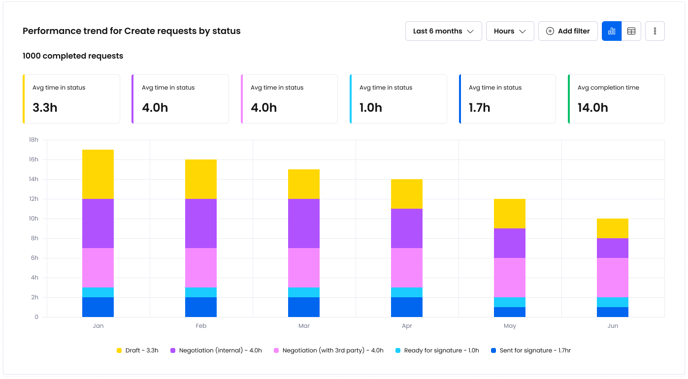
This chart measures how much time Create requests spend in each status before being marked as ‘Completed’, then groups completed requests into time periods along the x-axis based on date submitted.
This chart helps you understand lifecycle efficiency and monitor performance trends over time.
Answer questions like:- What is the average time spent in Draft status?
- Has the average time spent in Draft status decreased after we changed our process?
- Has the average time it takes to complete an Order Form decreased over the last 6 months?

Performance comparison for Create requests
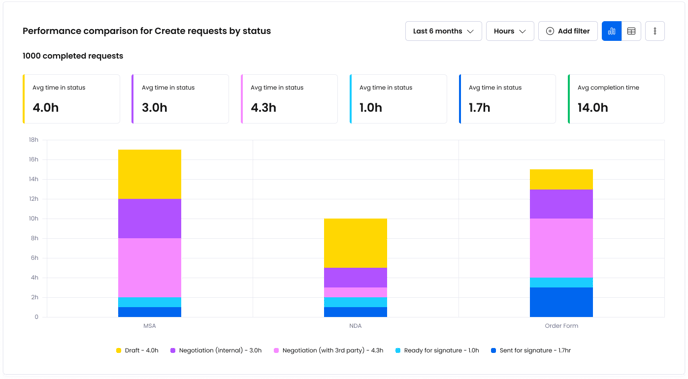
This chart measures how much time Create requests spend in each status before being marked as ‘Completed’, then groups completed requests by Template along the x-axis.
This chart helps you understand overall performance for different agreement types, and performance compares between templates.
Answer questions like:
- How long did Order Forms typically spend in Draft status over the last 6 months?
- How does the average time spent in Draft status compare between Order Forms and NDAs?
- Which agreement types spend the greatest amount of time in Draft?
For a more detailed example of how this chart works, click the image below:

Performance trend for Review requests
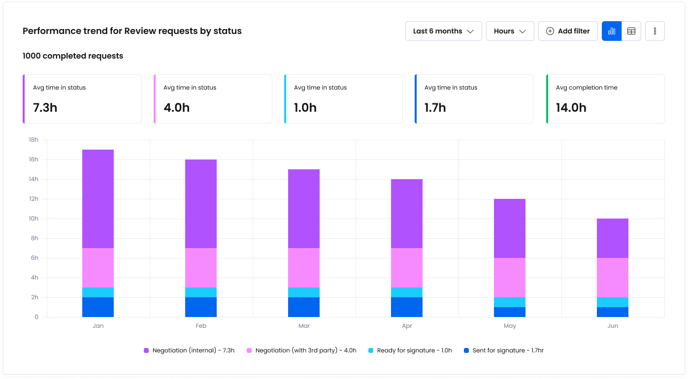
This chart measures how much time Review requests spend in each status before being marked as ‘Completed’, then groups completed requests into time periods along the x-axis based on date submitted.
This chart helps you understand lifecycle efficiency and monitor performance trends over time.
Answer questions like:
- What is the average time spent in internal negotiation?
- Has the average time spent in internal negotiation decreased after we changed our process?
- Has the average time it takes to complete an MSA decreased over the last 6 months?
For a more detailed example of how this chart works, please refer to the 'Performance trend for Create requests' example.
Performance comparison for Review requests
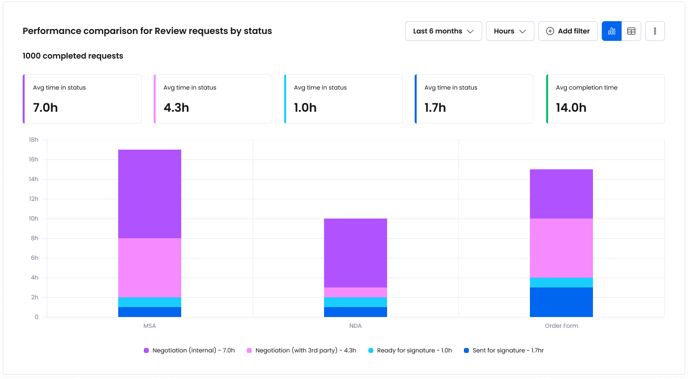
This chart measures how much time Review requests spend in each status before being marked as ‘Completed’, then groups completed requests by Template along the x-axis.
This chart helps you understand overall performance for different agreement types, and performance compares between templates.
Answer questions like:
- How long did Order Forms typically spend in internal negotiation over the last 6 months?
- How does the average time spent in internal negotiation compare between MSAs and DPAs?
- Which agreement types spend the greatest amount of time in external negotiation?
For a more detailed example of how this chart works, please refer to the 'Performance comparison for Create requests' example.
Number of completed requests by type
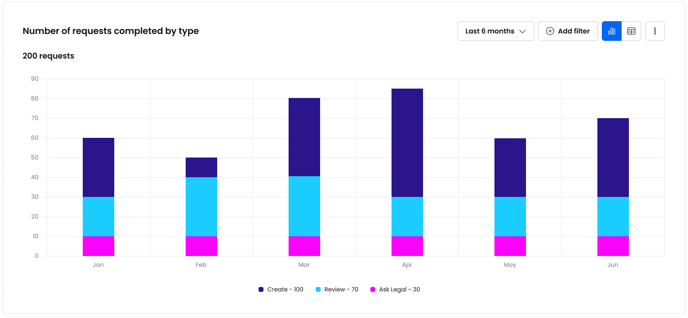
This chart measures the number of requests being completed over time, broken down by type. It helps you monitor the volume of completed agreements across the business.
- How many Create requests were completed in the last 6 months?
- How many Review requests are being completed month by month?
- Is the volume of completed requests increasing?
Completed tasks by met/exceeded
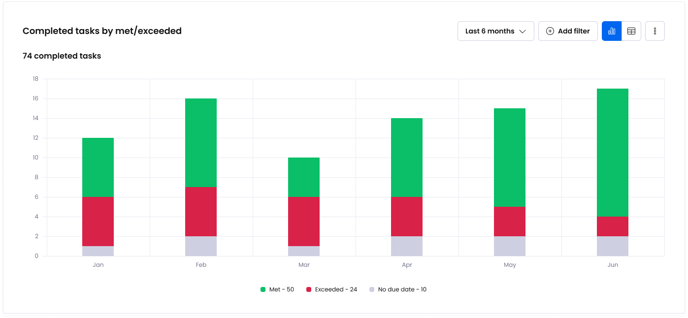
This chart measures the number of tasks completed, and which met or exceeded the expected task due date. Completed tasks are then grouped by time period along the x-axis based on date completed.
This chart helps you to understand how many tasks are being completed week by week or month by month, and helps you monitor overall SLA performance.
Answer questions like:
- How many tasks were completed last month?
- How many tasks failed to meet the expected due date?
- Is our performance getting better worse?