
How to interpret the error codes you may see after a contract is uploaded
In certain scenarios, a contract may fail to process when it is uploaded to the Repository. When clicking on the '# Contract processing' button, you will see which contracts have errored, alongside an error code:
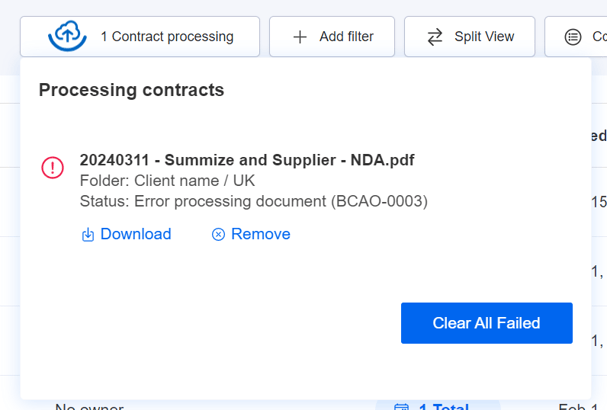
The most common reason a document may error is that the document itself is corrupt or password protected. Before attempting to reupload, we recommend trying to open the document on your computer's PDF viewer, to check that you're able to open it.
Most Common Error Codes:
PDC-020: PDF Compression Failure
The PDC-020 error occurs when our PDF reader fails to process a file during the compression stage. This issue typically arises from one of three conditions:
- The PDF structure is too complex for the reader to process
- The file is corrupted or damaged
- The file contains special features incompatible with the compression engine
Diagnosing the Issue
If you can successfully open the file in a standard PDF viewer, the file is not corrupted. This indicates the PDF's complexity or specific features are preventing successful compression.
Resolution Methods
Method 1: Flatten the PDF
Use the "Print to PDF" function to create a flattened version of the document. This process removes layers, form fields, and other advanced features that may interfere with compression. This is the recommended first approach.
Method 2: Resave Using an Alternative PDF Tool
Open the affected file in a different PDF reader (such as Adobe Acrobat, Foxit, or Preview) and save it as a new PDF file. This process often resolves compatibility issues by normalizing the file structure.
BCAO-0003: Azure OCR failed
This error occurs when Summize encounters a damaged or corrupt PDF file during upload. The file's integrity has been compromised, preventing successful processing.
Root Causes
Common factors that damage PDF files include:
- Incompatible or corrupted images embedded in the document
- Low-quality document scans that cannot be properly rendered
- Complex font encodings that exceed processing capabilities
- Elaborate background images or graphics that create rendering conflicts
- File structure corruption during creation or transfer
Essentially, any content element that cannot be properly rendered in standard PDF format can compromise the file and cause OCR processing to fail.
Resolution Methods
Method 1: Restore from Backup
If available, revert to a previous undamaged version of the PDF file.
Method 2: Repair Using Third-Party Tools
Open the damaged file in a PDF reader (such as Adobe Acrobat, Foxit Reader, or similar tools) and re-save it as a new PDF. This process often repairs minor structural issues.
Method 3: Recreate from Source
Generate a new PDF from the original source document (Word, Excel, InDesign, etc.) to ensure a clean file structure.
Full List of Error Codes
Alongside the above two most common codes, here are the full list of potential error codes that may be displayed.
A2C-022: Pdf dom conversion failed.
AC-047: Apply Clause unknown error.
AC-051: An error occurred attempting to save the clause result.
AC-054: Failed to retrieve parties in order to apply clauses.
AC-055: Failed to retrieve clauses to apply to the document.
AC-056: Failed to retrieve the document in order to apply the clause.
AC-057: An error occurred when attempting to add the clause results comment.
BCAO-0001: Azure OCR Error.
BCAO-0002: Azure OCR invalid image.
BCAO-0003: Azure OCR failed.
DFF-001: Document finalisation failed.
DFI-001: Document finalisation invalid.
DPCP-001: One or more clauses failed to apply.
DPD-034: Docx file read error.
DPI-001: The document processing request is invalid.
DPMF-001: Failed to move the file.
DPSP-001: Failed to save parties.
DPS-023: Paragraph to sentences conversion failed.
DPS-024: Error while attempting to detect parties.
DPUE-099: Document processing unknown error.
DPUF-001: An unsupported file type was supplied.
PDC-020: Pdf compression error.
PDC-021: Pdf post processing.
WCAL-020: An error occurred when attempting to write the clause results date to the calendar.