
Use this guide to learn how each Pending chart works and discover the key questions each one can help answer.
Request Analytics is available to Power Pro and Power users
Skip to:
Pending requests by date submitted
Pending requests by owner (user)
Pending requests by owner (group)
Pending tasks assigned to user by due date
Pending tasks assigned to group by due date
Pending requests by date submitted
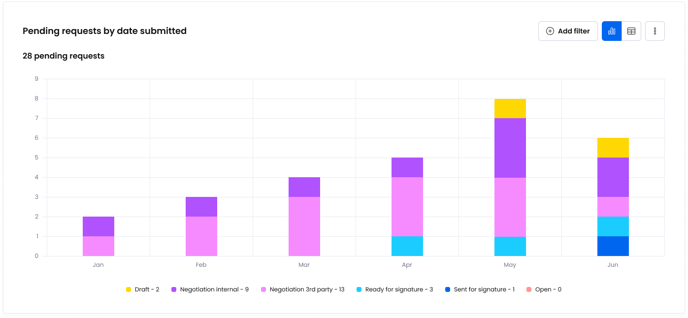
This chart shows the number of pending requests based on when they were first submitted, broken down by status. It helps you understand how many requests are yet to be completed, how long they have been active since, and what stage they are in.
Answer questions like:
- How many requests submitted in the last 6 months are still pending
- How many requests submitted in Jan are still in negotiation?
Pending requests by owner (user)
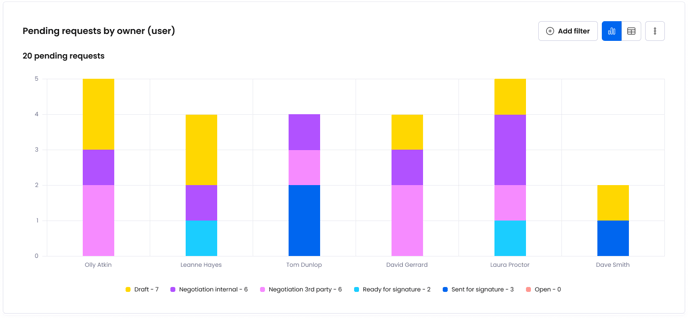
This chart shows the number of pending requests owned by different individual users, broken down by request status. It helps you understand the current workload of specific users and compare the workload distribution across multiple users.
Answer questions like:
- Who owns the least amount pending requests out of the Legal team?
- Who owns the most pending requests in Draft?
Pending requests by owner (group)
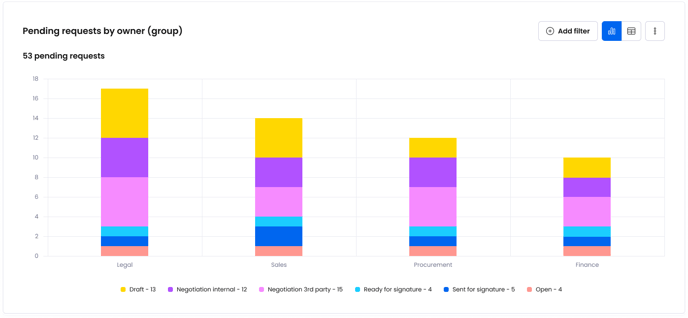
This chart shows the number of pending requests owned by users from different groups, broken down by request status. It helps you understand the current workload of specific groups and compare the workload distribution across multiple groups.
Answer questions like:
- Which group owns the most pending requests?
- How many pending requests are owned by users from the Sales team?
- How many pending requests owned by the Legal team are still in Draft?
Pending tasks assigned to user by due date
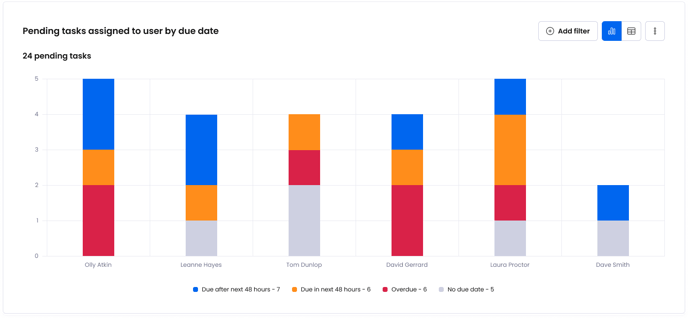
This chart shows the number of pending tasks assigned to different individual users, broken down by task due date. It helps you understand the current workload of specific users and compare the workload distribution across multiple users.
Answer questions like:
- Who has the most overdue tasks?
- How many pending tasks does Laura have compared to Tom or David?
- Which users have the most tasks due in the next 48 hours?
Pending tasks assigned to group by due date
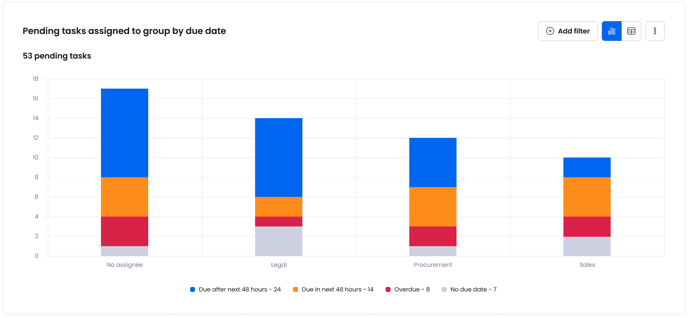
This chart shows the number of pending tasks assigned to different groups, broken down by task due date. It helps you understand the current workload of specific groups and compare the workload distribution across multiple groups.
Answer questions like:
- How many pending tasks does Finance have compared to Sales or Marketing?
- How many overdue tasks does Sales have?
- How many tasks are assigned to Legal that are due in the next 48 hours?