
Introducing the contracts view on Summize
Skip to:
Overview
Page layout
Tool panel
Overview
The Contract View provides a digital preview of your signed contract. Each of the signed contracts added to your Repository have their own Contract View which can be access by clicking on contract in the Repository Table.
The Contract View offers an extensive range of tools such as; Tasks, Conversations, Calendar events, Clause Summary and Playbook, all designed to help you manage your contracts post-signature.
Page layout
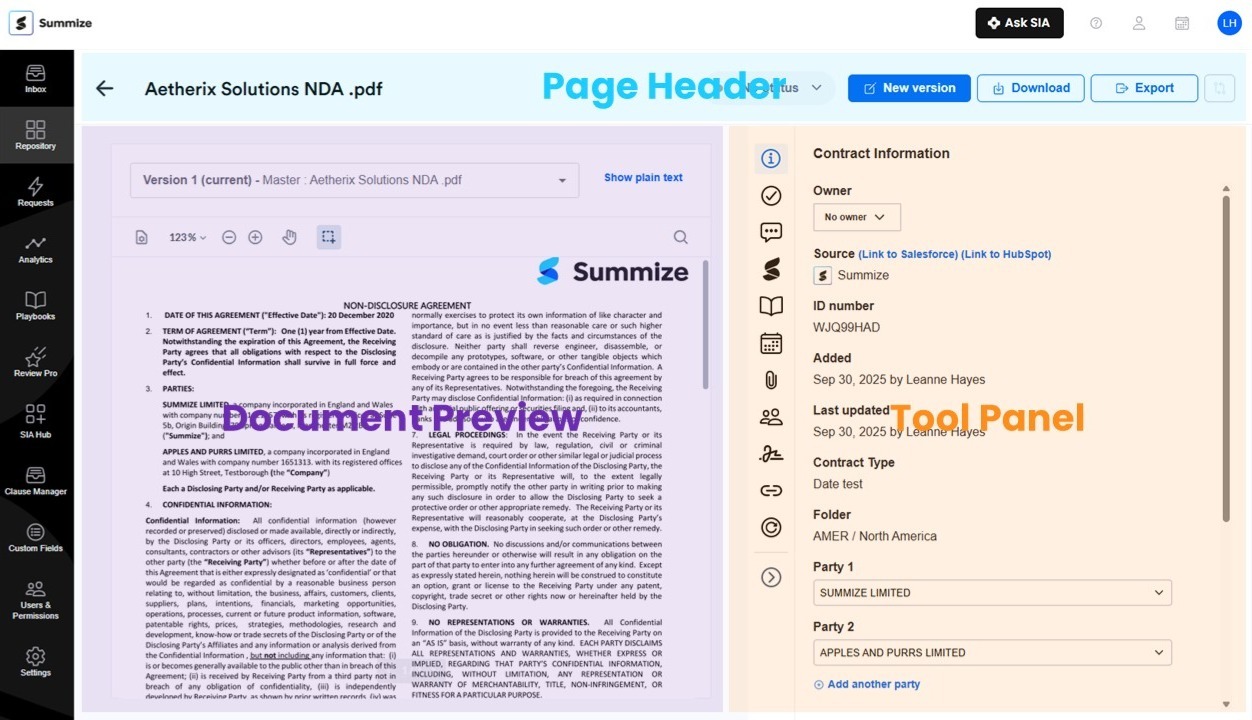
The Contract View is split into three main areas; the page header, the preview section and the tool panel.
Page header
Along the top of the UI is the page header which contains the name of the contract, the status indicator and key actions such as New Version, Download and Export.
Document Preview
Under the page header located in left hand portion of the UI is the preview section. This is your digital preview of the contract and includes a version selector at the top as well as a range of preview tools such as; zoom, pan and search.
Tool panel
Under the page header located in the right hand portion of the UI is the tool panel which provides quick access to a range of tools such as Tasks, Conversations and Clause Summary.
Tool panel
The tool panel has an extensive range of valuable tools designed to help you manage each contract. The tool panel is split into the following sections:
Contract Information
This is the default section of the tool panel that collects key information about the contract such as the; Owner, Contract type, Folder and Parties.
Tasks
This section lets you view and manage tasks for a contract. From here you can add and assign tasks for things like renewals, payments, renegotiations or other post-signature obligations related to a contract. You can also edit, manage and complete tasks from this section of the tool panel. There are two tabs in the tasks section. The ‘Pending’ tab lists all tasks that need to be completed. The ‘Completed’ tab lists all tasks that have been completed and are no longer pending.
Conversations
This section lets you view and manage conversations for a contract. From here you can start new conversations and reply to comments for simple, secure collaboration with others in your organisation. There are two tabs in the conversations section to help you manage your collaboration history. The ‘Active’ tab lists all active conversations. The ‘Resolved’ tab lists all conversations that have been marked as resolved and are no longer active.
Clause Summary
This section provides a summary of the various clauses in your contract that have been detected using Summize’s AI powered extraction engine. Surfacing the key information you need to know about a contract means you can get a concise summary of a contract within just minutes after adding a contract, or on-demand any time you need to.
Playbook
This section gives you quick access to your Playbooks so you can quickly and easily compare the contract contents to your standard positions and precedent clauses.
Insights
This section enables your Summize users to quickly and easily query your contracts for frequently asked questions.
Calendar events
This sections lists all the important upcoming calendar events for a contract for things like payment dates, renewal dates or termination dates so you can keep track of post-signature obligations.
Attachments
This sections lets you to store non-contractual files such as; images, screenshots, emails, internal documents or other associated files alongside a signed contract in the Repository. From here you can view, add and manage your attachments.
Analytics
This section gives you clause based telemetry compared with averages of other contracts.
History
This section provides an audit history of various actions and events that have occurred since the contract was added to the Repository such as conversation, version and task activity, including who performed each action.
You can see all of the above features in the video below: