
An introduction to Clause Manager - your control hub for summarising contracts!
Available to Power and Power Pro users only
What is Clause Manager?
Clause Summaries in Summize are directly linked to how your contract types and templates are configured in Clause Manager. The summaries displayed in a review request or repository contract reflect the setup and configuration in Clause Manager.
Designed for quick, efficient reviews, Clause Manager acts as the ‘control hub’ for Clause Summaries. Here's how it works:
-
Organised by Contract Types: Clause Manager separates your contracts into types, such as NDAs, MSAs, and Supplier Agreements. This allows you to define tailored clause lists for each type, ensuring they match the language and requirements specific to that type of contract.
-
Customisable and Targeted: By tailoring clauses for each contract type, you ensure that the summaries capture the information that matters most. For instance, the key details you'd want summarised in an NDA will likely differ from those in an MSA, and Clause Manager adapts accordingly.
-
Powered by Keywords: Clause Manager uses a keyword-based algorithm, where keywords provided by you guide the system. It scans contract text, flags relevant clauses, and applies a scoring system to determine matches.
With Clause Manager, you ensure that Clause Summaries are accurate, tailored, and ready for fast first-pass reviews.
Where can I find Clause Manager?
You must be a Power or Power Pro to access Clause Manager configuration. If you have been given access, you will find the widget on the left-hand side column within Summize, simply called ‘Clause Manager’:
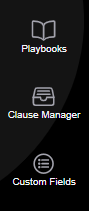
To learn how to add and edit Contract Types, use this guide.
To learn how to add and edit clauses, use this guide.
The Clause Manager on Summize provides you with an efficient first-pass review, but users are encouraged to always crosscheck the summaries that have been created.