
Map and sync data from signed contracts in your Repository back to Salesforce Opportunities to keep track of key information and obligations
Note: This feature is available for Salesforce Opportunities only (not available in Salesforce Accounts)
Note: V2 package required. Please refer to our installation and migration guides.
Summize will attempt to map to fields on an Opportunity that match the format specified below. Summize will only map the clauses and custom fields for Repository contracts.
Contracts in Summize can be linked in two ways:
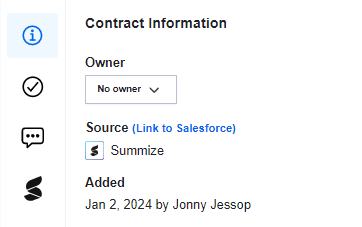
- Manually via the webapp using the ‘Link to Salesforce’ option shown below. Navigate to the Repository contract, click on the 'i' Icon in the panel, and click 'Link to Salesforce'.
- Automatically, when a Request which is already associated with an Opportunity is sent for signature using Summize, and that document, once signed, is sent to the Repository.
In Salesforce, the custom field must have the field name as smz_[clause/custom field name with spaces replaced with _].
For example, if you had a clause setup in Clause Manager in Summize called Duration which you wanted to map back to a Salesforce Opportunity, the Salesforce custom field would be smz_duration. If you had a Custom Field setup in Summize called Project Code that you wanted to map back to a Salesforce Opportunity, the Salesforce custom field would be smz_project_code.
Note: Data is mapped from Summize > Salesforce (not bi-directionally) so any changes made to that field's content in Salesforce will not map back to Summize. We advise that fields are setup so they are read-only for all users apart from the Admin to avoid any confusion.
These newly mapped fields will also be available in any reports.
Summize will also attempt to sync the following special fields to your Opportunity If you have the matching custom field setup in Salesforce:
|
Field name |
Summize Field |
|
smz_requestor |
Summize Requestor |
|
smz_assignedto |
Assigned to user email |
|
smz_createdby |
Created by user email |
|
smz_sigstatus |
Signature status |
Note: if you link more than one Repository record to an Opportunity, the mapping will take the original linked contract's values and will display that in the Opportunity's details