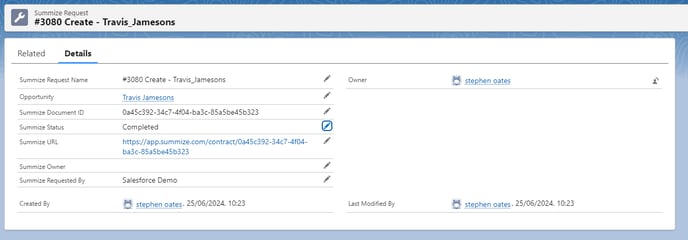
Use this guide to learn how to pull Summize Request data into a report in Salesforce
Ensure your Salesforce package is up to date by visiting this setup guide
Note: This feature is available for Salesforce Opportunities only (not available in Salesforce Accounts)
Summize packages a Custom Object in the managed package (Summize Request) which links to Opportunities only. This Custom Object syncs data one way from Summize to Salesforce and is updated when status or assignment is changed.
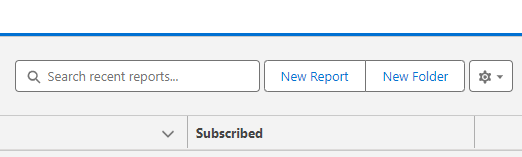
To build reports using Summize Request data in Salesforce, navigate to Reports, and click 'New Report' in the top right:
In the pop-up, type Summize in the search bar:
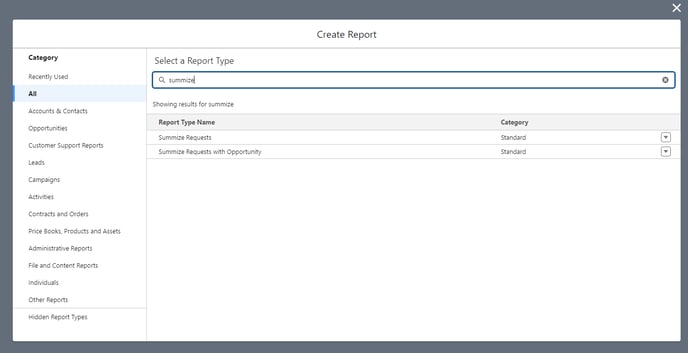
You will see two standard, out-of-the-box reports which are available by default:
Summize Requests: A list of all Summize Requests that have been submitted via the Salesforce integration, which you can use Salesforce's report filters to filter by All requests, My requests, My team's requests, and you can filter by time period.
Summize Requests with Opportunity: As above, including the Salesforce Opportunity name.
The custom object has the following fields, which can be added as columns in the report:
Summize Request Name
- Type: Text
- Description: The primary identifier for each Summize Request record.
Summize Document ID (smz__Document_Id__c)
- Type: Text
- Description: A unique identifier for the document associated with the Summize Request.
Opportunity (smz__Opportunity__c)
- Type: Lookup
- Reference To: Opportunity
- Relationship Name: Opportunity
- Description: A lookup field that associates the Summize Request with a specific Opportunity record.
Summize Status (smz__Status__c)
- Type: Text
- Description: Indicates the status of the Summize Request.
Summize URL (smz__Summize_URL__c)
- Type: URL
- Description: A URL link to the Summize Request.
Summize Requested By (smz__RequestBy__c)
- Type: Text
- Description: The name of the person who requested the Summize document.
Summize Owner (smz__Owner__c)
- Type: Text
- Description: The name of the person assigned as owner of the Summize Request.
Salesforce by default will allow these to be created, edit and deleted in the below interface. As this is a one-way sync, editing values in Salesforce will not edit the values in Summize. Therefore we suggest these permissions should be removed from everyone apart from the Admin to remove any confusion.