
The Summize AI Assistant is available in both Microsoft Word online and the native Word app. Simply ask the AI Assistant questions in the side panel to instantly rephrase, translate, shorten and query sections of your contract.
To use the AI Assistant on Word, you need to first download the Summize Word Add-in, if you haven't already.
Once done, the 'AI Assistant' tab will be available whenever you're reviewing your contracts.
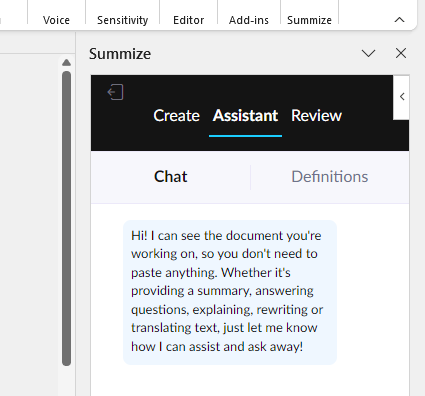
The AI Assistant helps you to seamlessly draft and negotiate contracts in Word. It takes and answers your questions via a chat experience, all in real time.
Inserting Text
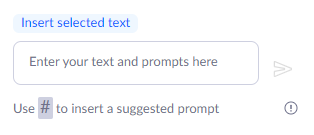
By default, the whole contract text has been automatically given to the Assistant, removing the need for you to copy and paste sections/all of the document first. If you would instead like to work with a specific paragraph, clause or section, (e.g. for re-drafting small sections) highlight the text in the document and click the 'Insert selected text' button that appears above the text box.
Prompting the AI Assistant
Once inserted, you can then type your prompt instruction before either clicking the send (arrow) button or hitting enter on your keyboard.
Note: If you need a new-line, then press 'shift + enter'.
See this in action in the video below:
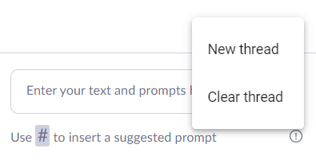
You can then continue to chat with the bot on the same topic, or you can start a new thread to chat about a new topic. To do this, click the 'i' icon in the bottom right:
Default Suggested Prompts
Some default prompts will be pre-loaded into your Summize account for easy access.
Simply type # into the chat, and a list of available prompts will appear. Each of these prompt titles has a more complex prompt in the Summize back-end.
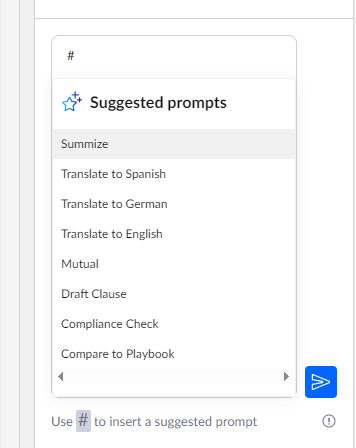
Select the prompt you would like to use, and hit enter.
See this in action in the video below:
If you would like to setup any more default prompts, to speed up any prompting that you do on a regular basis, speak to your Customer Success Manager.
Compare to Playbook
Follow this guide here to learn how to use the 'Compare to Playbook' default prompt, to compare your whole document, or specific clauses, to your playbook positions.
Example use cases and prompts
Here are some examples of prompts you can use on the AI Assistant:
To create executive summaries of contracts
"Create an executive summary of the text for my CEO. Output should be formal, designed to send as a message or copied into an email."
To translate text
"Translate to Spanish as if you were a lawyer drafting a commercial contract."
To make clauses mutal
"Make this clause mutually applicable: [CLAUSE]"
To draft clauses from scratch
"Please draft a clause to be inserted into a commercial contract. The name of the clause is at the end of this request. Provide the clause text with correct formatting: [CLAUSE]"
To perform legal research, such as researching the difference between governing laws
"Tell me what the differences are between Texas Governing law and New York Governing law."
To compare a clause to your gold standard (without using your Summize Playbook)
"Please compare the given clause to the gold standard clause below in detail and tell me the differences in content in bullet points.
'GOLD STANDARD CLAUSE'
[INSERT GOLD STANDARD CLAUSE HERE]
Please then redraft the given clause in its original language correcting these differences and adding any content from the below gold standard clause. The redraft should fit the style, language and format of the given clause. Then summarise what has changed in the redraft from the given text."
To run a quick red flag review of an NDA
"Assess the given text against all of the following rules and tell me if it does/doesn't comply.
If the given text is generally compliant to the rule reply GREEN FLAG.
If the given text is not compliant with the rule reply RED FLAG and identify how you have made your decision.
This is very important so make sure every rule is checked and the correct answer is given.
The rules:
1) There should be no monetary penalties in the event of a breach.
2) Confidential information should be clearly defined.
3) The receiving party must be able to share information with affiliates, including group companies.
4) There should be no indemnities.
5) The agreement duration must be <3 years .
6) Any obligation of confidentiality must last for no more than 5 years after termination of this agreement.
7) There most be no non-solicitation conditions.
8) The governing law must be New York."
To create Playbook content when you have some contract negotiation guidance which isn't structured or formatted
"Please convert this paragraph of contractual playbook guidance into the below 5 positions:
Standard position
Canned response
Example clause language
Fallback position
Fallback canned response"